


What problem does Add All People Link to Matches Trees solve?
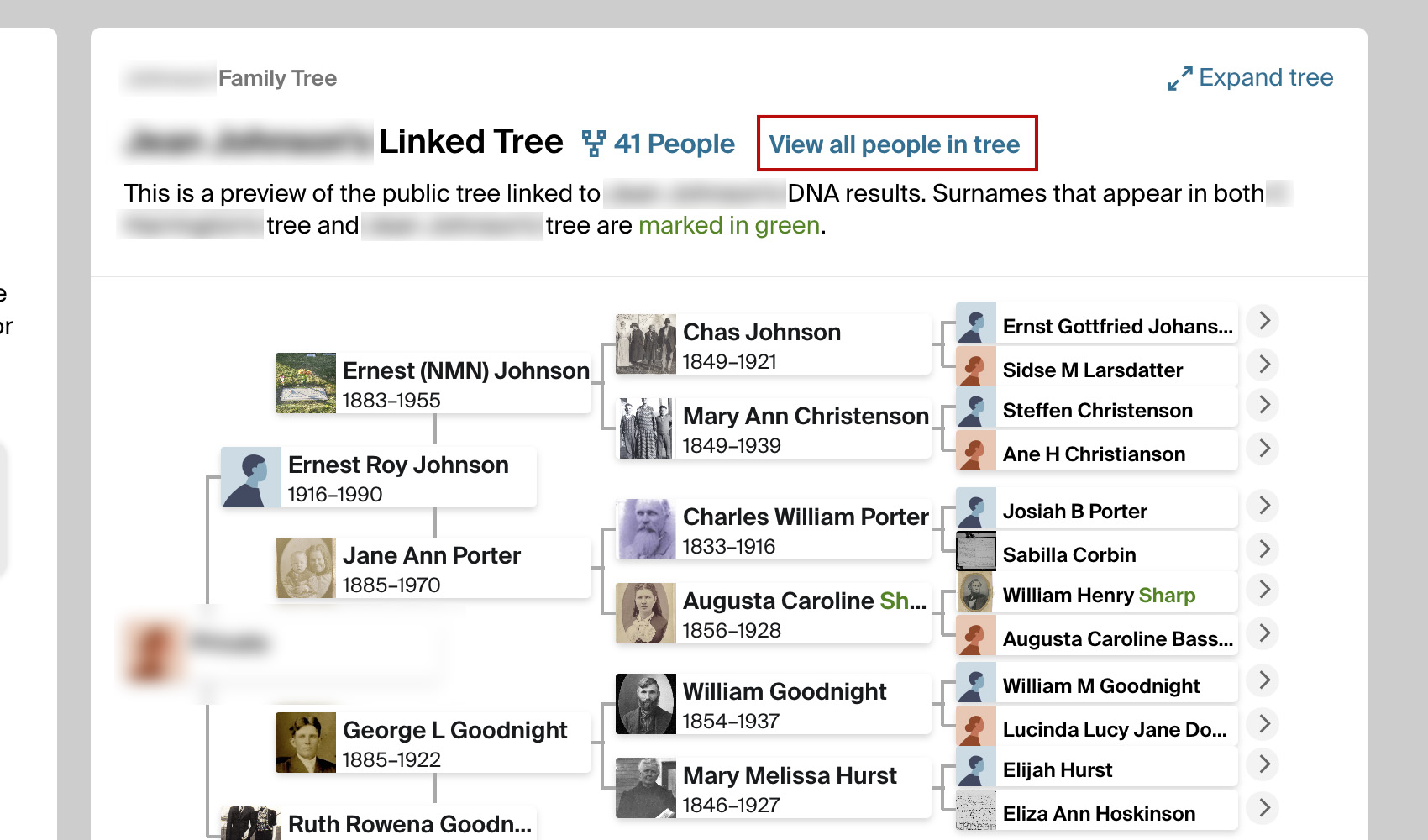
When viewing the Trees tab on Ancestry DNA, often you will want to view a list of all the people in your matches connected tree. Add All People Link to Matches Trees makes it easier to access the list of all people for your DNA matches.
How does Add All People Link to Matches Trees work?
With Add All People Link to Matches Trees, a new link titled View all people in tree will appear next to the number of people in the connected trees of your DNA matches. This feature eliminates unnecessary navigation steps and helps to quickly access the list of all people in the family tree.
How do I use Add All People Link to Matches Trees?
- Ensure Add All People Link to Matches Trees is enabled in the Genealogy Assistant pop-up panel.
- Navigate to the Trees tab of any DNA match on Ancestry.
- Locate the View all people in tree link next to the number of people in the connected tree.
- Click the View all people in tree link to access the list of all people in your matches connected tree.
Add All People Link to Matches Trees is a feature of the software Genealogy Assistant.
Genealogy Assistant is an extension for Google Chrome and Microsoft Edge which supercharges your family history research by adding 50+ custom features to popular genealogy websites like Ancestry, MyHeritage, FamilySearch, FamilyTreeDNA and more. You can watch a full video walkthrough on YouTube.
Install Genealogy Assistant for Google Chrome | Install for Microsoft Edge