


What problem does Save to Tree Name Auto-fill solve?
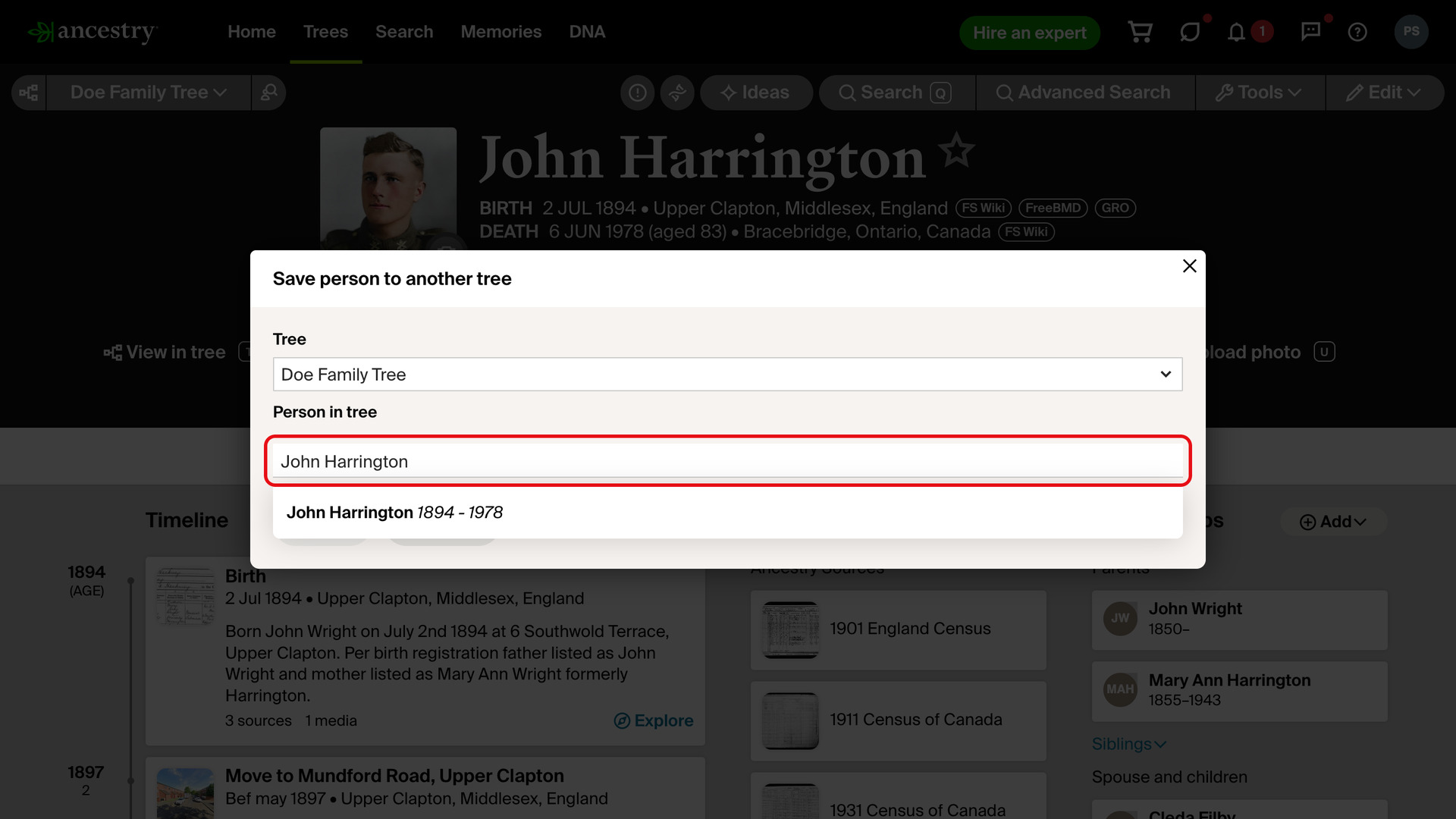
Save to Tree Name Auto-fill types the person’s name into the Person in tree box when you click Save to tree on an Ancestry profile page. The matching person in your tree is then ready to pick, and you never retype a name that is already at the top of the page.
How does Save to Tree Name Auto-fill work?
Click Save to tree in Ancestry’s Tools menu, or in the row of links added by Advanced Research Tools on Profiles. The window that opens already has the name from the top of the profile in its Person in tree box.
Ancestry’s suggestions run as if you had typed the name yourself. The matching people in your tree appear in the list under the box, and you can choose one without typing. If you change or clear the box, it is left alone so you can type another name.
Ancestry sometimes stops the save with a Heads up! message that needs a click on Continue. That click is made for you, so the save carries on without the extra step. Everything else in the window is left for you to choose.
How do I use Save to Tree Name Auto-fill?
- In the Genealogy Assistant pop-up panel, make sure Save to Tree Name Auto-fill is turned on.
- Open a person’s profile page on Ancestry and click Save to tree. The window opens with the name already in Person in tree.
- Choose the matching person from the list under the box, then finish the save as usual.
Related features
- Text Records Name Auto-fill: Fills in the Name box when you save a transcribed record to your tree, taking the name from the record so there is nothing to type or copy.
- Image Records Name Auto-fill: Image records get the same treatment, with the name attached to the image you are viewing filled into the Person in tree box on the Save to Tree window.
- Advanced Research Tools on Profiles: Adds Save to Tree, Quick Edit and Edit Relationships to the research tools menu on profile pages, including other members’ trees, with a shortcut letter beside each link.
Save to Tree Name Auto-fill is a feature of the software Genealogy Assistant.
Genealogy Assistant is an extension for Google Chrome, Mozilla Firefox, Microsoft Edge and Apple Safari which supercharges your family history research by adding over 100 custom features to popular genealogy websites like Ancestry, MyHeritage, FamilySearch, FamilyTreeDNA and more. You can watch a full video walkthrough on YouTube.
Install Genealogy Assistant for Google Chrome | Install for Mozilla Firefox | Install for Microsoft Edge | Install for Apple Safari