


What problem does Add Select All People Link to Hints solve?
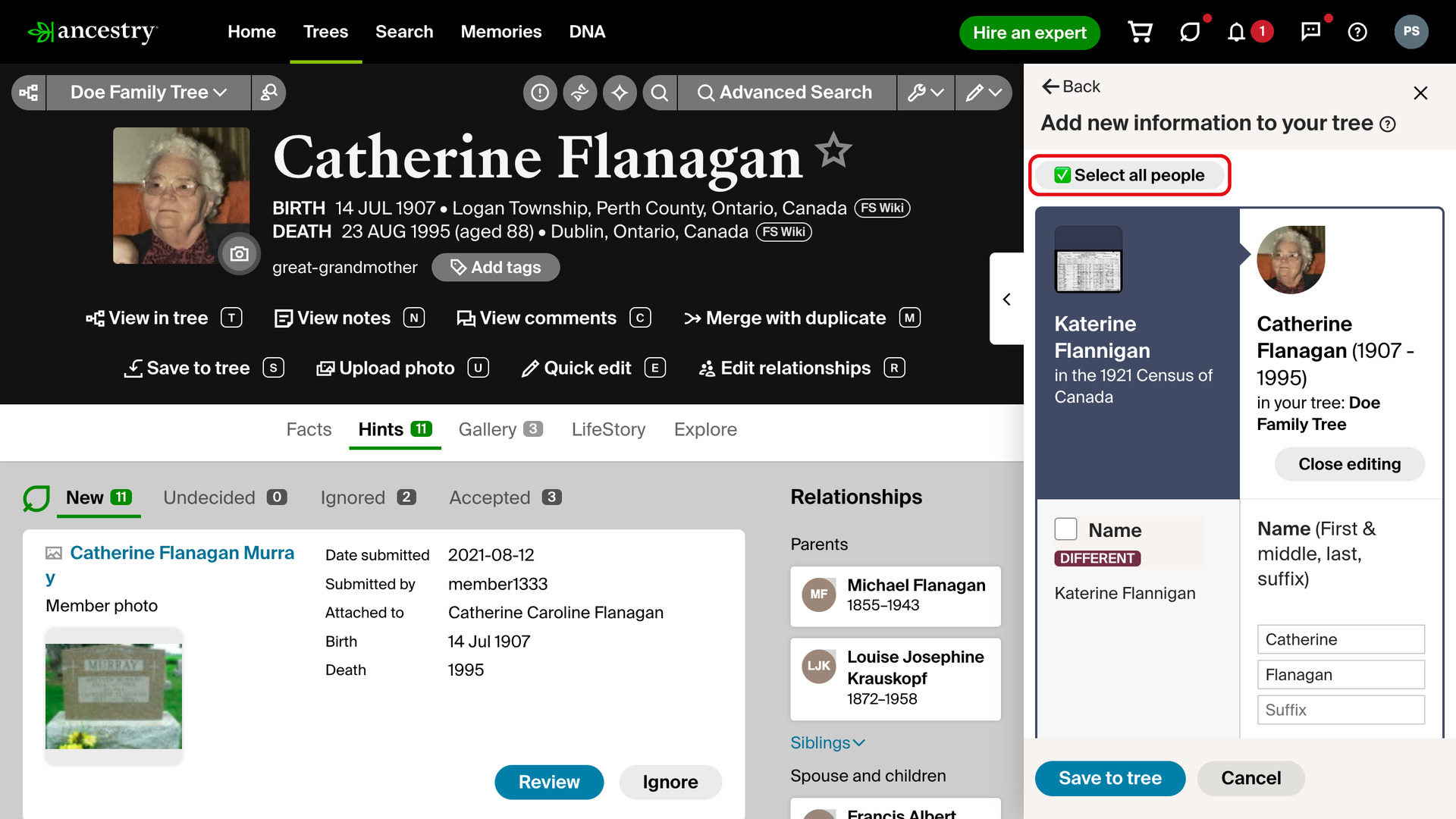
Add Select All People Link to Hints adds a Select all people button to the hint sidebar on a person’s Hints tab. One click ticks every family member from the record, where otherwise each person in a long family list has to be ticked one at a time.
How does Add Select All People Link to Hints work?
On a person’s Hints tab, click Review on a hint and then Yes. The sidebar moves on to Add new information to your tree, which lists the people from the record. The Select all people button appears at the top of the sidebar.
Clicking it ticks the box for every person in the sidebar and leaves the boxes for their facts as Ancestry set them. The button then reads Deselect all people; click it to untick everyone again. It goes away when you save, cancel or close the sidebar.
Hints you review from the All hints page open the full Add new information to your tree page instead of the sidebar. There, Add Select All People Link to Records adds the same Select all people button beside Save to tree.
How do I use Add Select All People Link to Hints?
- In the Genealogy Assistant pop-up panel, make sure Add Select All People Link to Hints is turned on.
- Open a person in your family tree and click the Hints tab.
- Click Review on a hint, then Yes. The sidebar shows Add new information to your tree.
- Click Select all people at the top of the sidebar. Every person is ticked.
- To untick everyone, click Deselect all people.
Related features
- Add Select All People Link to Records: Puts the same Select all people button on the Add new information to your tree page, for records, hints and people saved from another member’s tree.
- Save to Tree Name Auto-fill: Saving a person to your tree fills in the Person in Tree box with their name for you, which saves a lot of typing when building out a DNA match’s tree.
- Text Records Name Auto-fill: Fills in the Name box when you save a transcribed record to your tree, taking the name from the record so there is nothing to type or copy.
Add Select All People Link to Hints is a feature of the software Genealogy Assistant.
Genealogy Assistant is an extension for Google Chrome, Mozilla Firefox, Microsoft Edge and Apple Safari which supercharges your family history research by adding over 100 custom features to popular genealogy websites like Ancestry, MyHeritage, FamilySearch, FamilyTreeDNA and more. You can watch a full video walkthrough on YouTube.
Install Genealogy Assistant for Google Chrome | Install for Mozilla Firefox | Install for Microsoft Edge | Install for Apple Safari