


What problem does Download Matches Pages as CSV File solve?
Ancestry does not let you export your DNA match list. If you want to sort, filter, or keep an offline copy, you have to copy the data off the screen one row at a time. Download Matches Pages as CSV File adds a single button that walks through your match list and saves every match to a spreadsheet-ready CSV file.
How does Download Matches Pages as CSV File work?
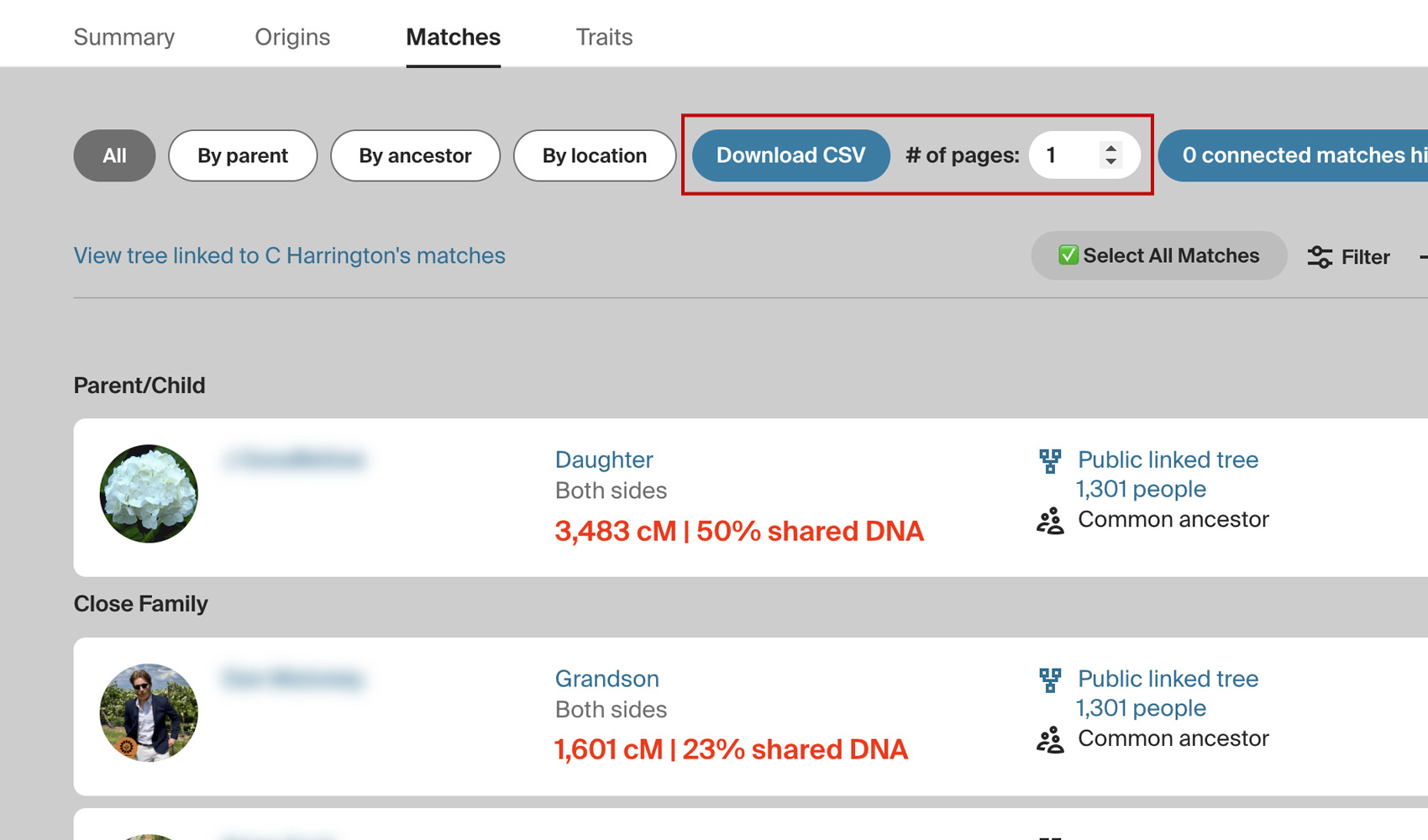
A new button titled Download CSV appears at the top of your DNA Matches page, along with an input box to select the number of pages you would like to download. Click select all under the box to fill in every page from the one you are on. The download starts from the page on screen and follows any filters or sort order you have applied.
Matches are loaded 100 at a time, and a progress bar shows how many have been saved and roughly how long is left, with a Cancel button if you need to stop. Large downloads slow down on their own as they grow, so Ancestry is less likely to limit your account partway through.
Every match is saved as soon as it is loaded, so a download that stops loses nothing. If you cancel, close the tab, or Ancestry starts limiting requests, a Resume download button appears in the filters toolbar. Clicking it carries on where it stopped and saves one file with every match.
When Ancestry limits requests, the download pauses for two minutes and tries once more before it stops. The Resume download button shows how much was completed, and the × on it discards the stopped download. A stopped download is kept for 30 days.
Beside the button is a gear icon labelled Download Settings, which opens the download settings panel from the match list itself. There you can change the download method and the download speed, and turn on the additional DNA details described below.
Ancestry keeps two figures behind a pop-up on each match: the unweighted shared DNA and the longest shared segment. Turning on Ancestry additional DNA details adds both to the file beside the shared cM, with the average segment size (the unweighted cM divided by the number of segments).
Each match needs its own request for these figures, so the first download with them takes longer. They are remembered for each DNA test, so later downloads only look up new matches and those whose shared cM has changed, which makes a repeat download much quicker.
How do I use Download Matches Pages as CSV File?
- Ensure Download Matches Pages as CSV File is enabled in the Genealogy Assistant pop-up panel.
- Open your AncestryDNA match list. To download only some of your matches, apply Ancestry’s filters or sort first and go to the page you want to start from. The download follows the list on screen.
- Enter the number of pages to include in the box next to the button, or click select all to include every page from the one you are on.
- Click Download CSV. Watch the progress bar and click Cancel if you need to stop early. The CSV file is saved to your downloads when it finishes.
- If a download stops before it finishes, click Resume download in the filters toolbar to carry on, or the × beside it to discard it.
- To change the download speed or add the extra DNA details, click the gear icon beside Download CSV. Set Download speed to Standard, Walk or Crawl, tick Ancestry additional DNA details if you want those columns, and click Save & Close. Standard suits most lists, so choose Walk or Crawl only if Ancestry still limits your downloads.
- You can also open the Genealogy Assistant pop-up panel and click the settings icon next to Download Matches Pages as CSV File. This opens the Advanced Settings page at the Download Options section, where the same settings are available. Changes save automatically.
CSV Columns
Match Name, Shared cM, Shared Segments, Shared Percentage, Estimated Relationship, Match Side, Family Tree, Tree Size, Common Ancestor, Notes, Groups, Connected To Tree, URL, GUID, Match Date, Possible Relationships, Meiosis, Managed By, Gender, Starred, Hidden
Possible Relationships lists every relationship Ancestry considers possible for the DNA you share, each with its likelihood, for example 1st cousin 1x removed (52%). Meiosis is Ancestry’s estimate of how many generations separate you, counted up to your common ancestors and back down.
Managed By names the person who manages the test when it is not the match themselves, and Gender is the gender Ancestry shows for the match. Starred and Hidden read Yes for the matches you have starred or hidden on Ancestry.
With Ancestry additional DNA details turned on, three more columns are added directly after Shared cM: Unweighted cM, Longest Segment cM and Avg Segment cM (the unweighted cM divided by the number of segments). The Match Date column is the date the match first appeared in your match list, so sorting a new download by that column, or comparing it against an older file, shows you which matches are new since your last download.
NOTICE: CSV DOWNLOAD TOOLS ARE FOR PERSONAL RESEARCH PROJECTS ONLY.
Download Matches Pages as CSV File is a feature of the software Genealogy Assistant.
Genealogy Assistant is an extension for Google Chrome, Mozilla Firefox, Microsoft Edge and Apple Safari which supercharges your family history research by adding over 100 custom features to popular genealogy websites like Ancestry, MyHeritage, FamilySearch, FamilyTreeDNA and more. You can watch a full video walkthrough on YouTube.
Install Genealogy Assistant for Google Chrome | Install for Mozilla Firefox | Install for Microsoft Edge | Install for Apple Safari