


What problem does MyHeritage Download Matches Pages as CSV solve?
MyHeritage does not give you a way to export your DNA match list. MyHeritage Download Matches Pages as CSV reads your match pages directly in the browser and saves them to a spreadsheet you can sort, filter, and keep with the rest of your research notes.
How does MyHeritage Download Matches Pages as CSV work?
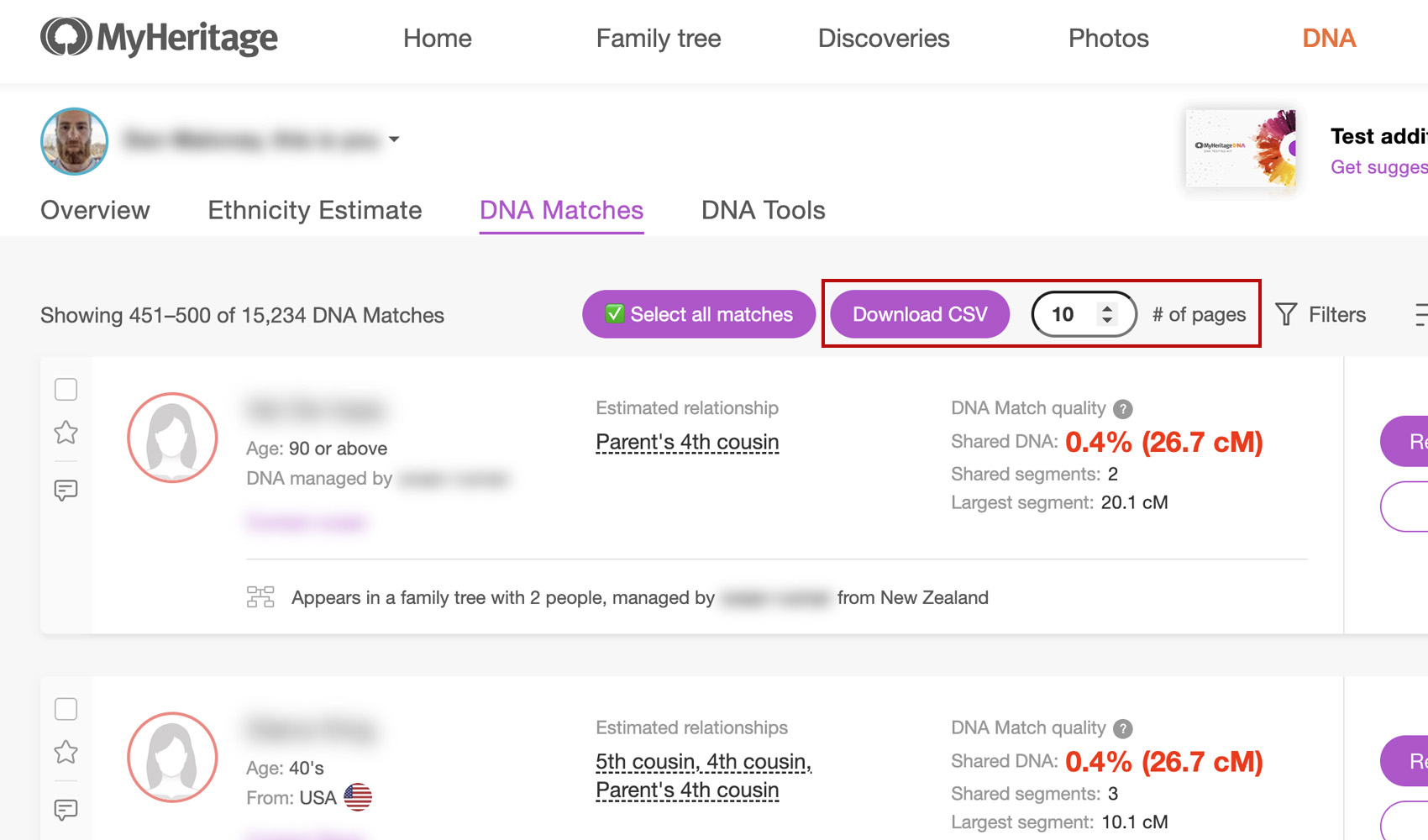
On the MyHeritage DNA matches list, a new Download CSV button is added next to the existing toolbar, along with a small input field where you choose how many pages to download and a gear icon labelled Download Settings. Click the button and Genealogy Assistant walks through each page in turn, collects the visible match details, and combines them into a single CSV file. A progress overlay shows you which page is being processed and includes a cancel button so you can stop the download at any time. Click the gear icon to open the download settings panel directly from the matches page, where you can change the download method, download speed, and turn batch mode on or off without leaving the page.
The downloaded file is named {Test Name} {GUID} – MyHeritage Match List.csv and contains the following columns:
- Match Name
- Estimated Relationship
- Shared cM
- Shared Percentage
- Shared Segments
- Largest Segment
- Tree Size
- Location
- Groups
- Star Status
- GUID
- URL
How do I use MyHeritage Download Matches Pages as CSV?
- Ensure MyHeritage Download Matches Pages as CSV is enabled in the Genealogy Assistant pop-up panel.
- Navigate to your MyHeritage DNA matches list.
- In the input field next to the Download CSV button, enter the number of pages you want to download. Leave it empty to download every page.
- Click Download CSV. A progress overlay will appear and step through each page.
- To stop the download early, click Cancel in the overlay. The CSV will be saved with whatever has been collected so far.
- When the process finishes, the CSV file will be saved to your downloads folder.
NOTICE: CSV DOWNLOAD TOOLS ARE FOR PERSONAL RESEARCH PROJECTS ONLY.
MyHeritage Download Matches Pages as CSV is a feature of the software Genealogy Assistant.
Genealogy Assistant is an extension for Google Chrome, Mozilla Firefox, Microsoft Edge and Apple Safari which supercharges your family history research by adding over 100 custom features to popular genealogy websites like Ancestry, MyHeritage, FamilySearch, FamilyTreeDNA and more. You can watch a full video walkthrough on YouTube.
Install Genealogy Assistant for Google Chrome | Install for Mozilla Firefox | Install for Microsoft Edge | Install for Apple Safari