

What problem does FindAGrave Search Genealogy Websites solve?
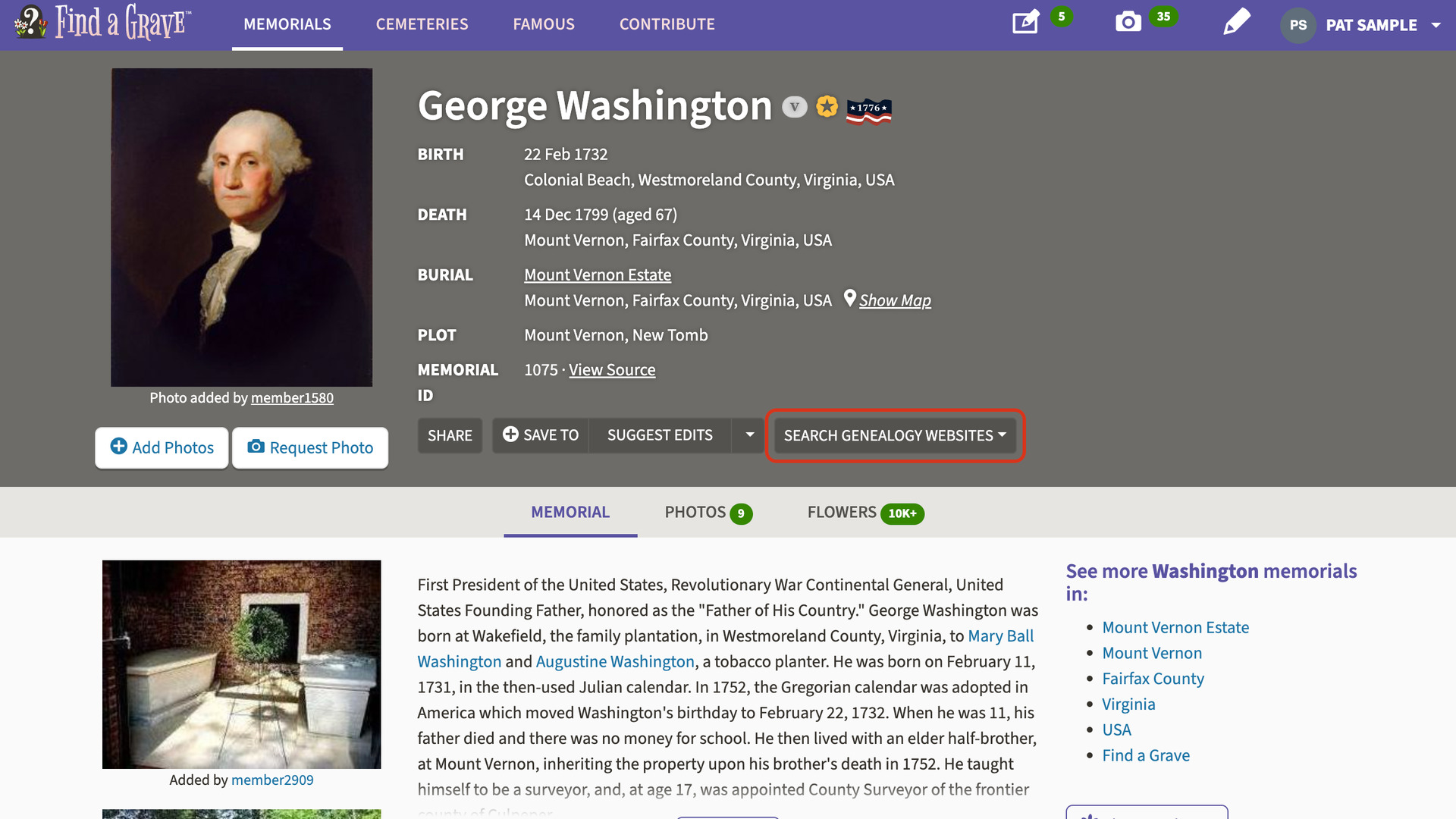
FindAGrave Search Genealogy Websites adds a Search Genealogy Websites button to FindAGrave memorial pages. It searches other genealogy sites for the person on the memorial, with their details already filled in. Without it, the name, dates, places and family have to be retyped into one search form after another.
How does FindAGrave Search Genealogy Websites work?
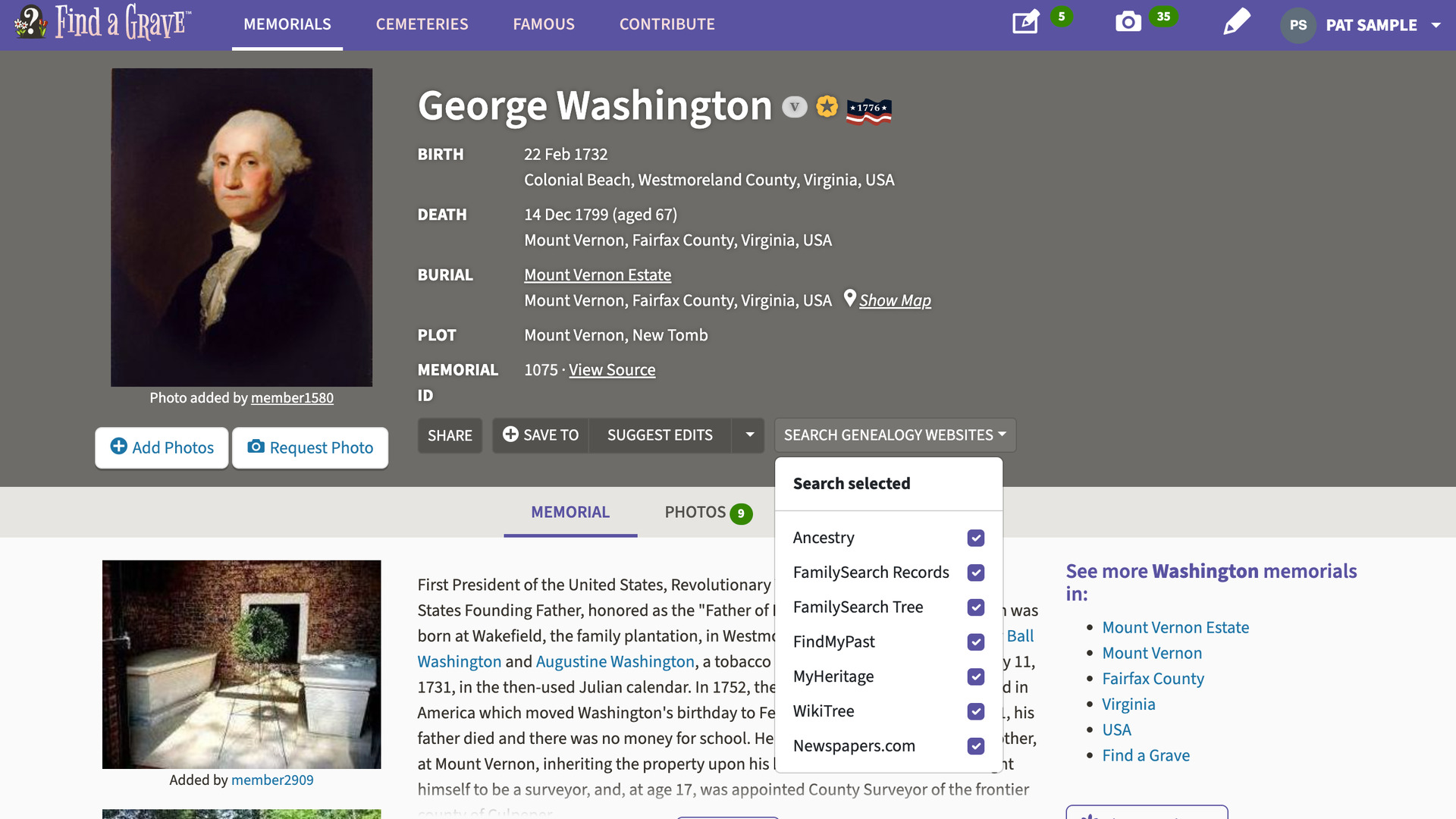
The button sits at the end of the row of buttons that starts with Share. Hover over it, or click it, to open a menu of sites. Click a site to search it in a new tab. Search selected, at the top of the menu, opens every ticked site at once, each in its own tab.
The menu searches these sites:
- Ancestry
- FamilySearch Records
- FamilySearch Tree
- FindMyPast
- MyHeritage
- WikiTree
- Newspapers.com
Each search is filled in from the memorial: the name, the birth and death years and places, and the parents and spouse listed under Family Members. For a mother or a spouse, the maiden name is used where the memorial shows one, since that is the name most records carry.
Each site gets as much of this as it can use. The Ancestry, FamilySearch and MyHeritage searches include the parents and spouse. WikiTree gets the name, years and places, and Newspapers.com searches for the name between the birth and death years.
The ticks beside the sites are remembered, so you choose your sites once. Add Advanced Search to Profiles on Ancestry and MyHeritage Search Genealogy Sites from Tree use the same set. A change on any of the three carries over to the others.
The Ancestry search opens on your regional Ancestry site, such as Ancestry.ca or Ancestry.co.uk. Genealogy Assistant notes which one you use on your first visit to Ancestry. You can change it on the Advanced Settings page under Set Ancestry Domain.
How do I use FindAGrave Search Genealogy Websites?
- In the Genealogy Assistant pop-up panel, make sure FindAGrave: Search Genealogy Sites is turned on.
- Open a memorial page on FindAGrave.
- Hover over Search Genealogy Websites, at the end of the row beside Share. The menu of sites opens.
- Click a site name. The search opens in a new tab.
- To search several sites at once, untick the ones you do not use and click Search selected. Each ticked site opens in its own tab.
- To change the regional Ancestry site, click Edit advanced settings at the bottom of the pop-up panel.
- Click Set Ancestry Domain to open the section.
- Choose your site under Domain. It saves automatically.
Related features
- Add Advanced Search to Profiles: Search anyone in your Ancestry tree on eight genealogy websites from their profile, with civil registration indexes beside each place and an age added to the death date.
- MyHeritage Search Genealogy Sites from Tree: Search anyone in a MyHeritage family tree on other genealogy websites from a Search Genealogy Sites button, filled in with their names, dates and places.
- Advanced Search for Records Page: A Search menu at the top of transcribed record pages looks for the same person on other genealogy websites, using the names, dates and places in the record.
FindAGrave Search Genealogy Websites is a feature of the software Genealogy Assistant.
Genealogy Assistant is an extension for Google Chrome, Mozilla Firefox, Microsoft Edge and Apple Safari which supercharges your family history research by adding over 100 custom features to popular genealogy websites like Ancestry, MyHeritage, FamilySearch, FamilyTreeDNA and more. You can watch a full video walkthrough on YouTube.
Install Genealogy Assistant for Google Chrome | Install for Mozilla Firefox | Install for Microsoft Edge | Install for Apple Safari