


What problem does 23andMe Highlight Shared Matches 50cM+ solve?
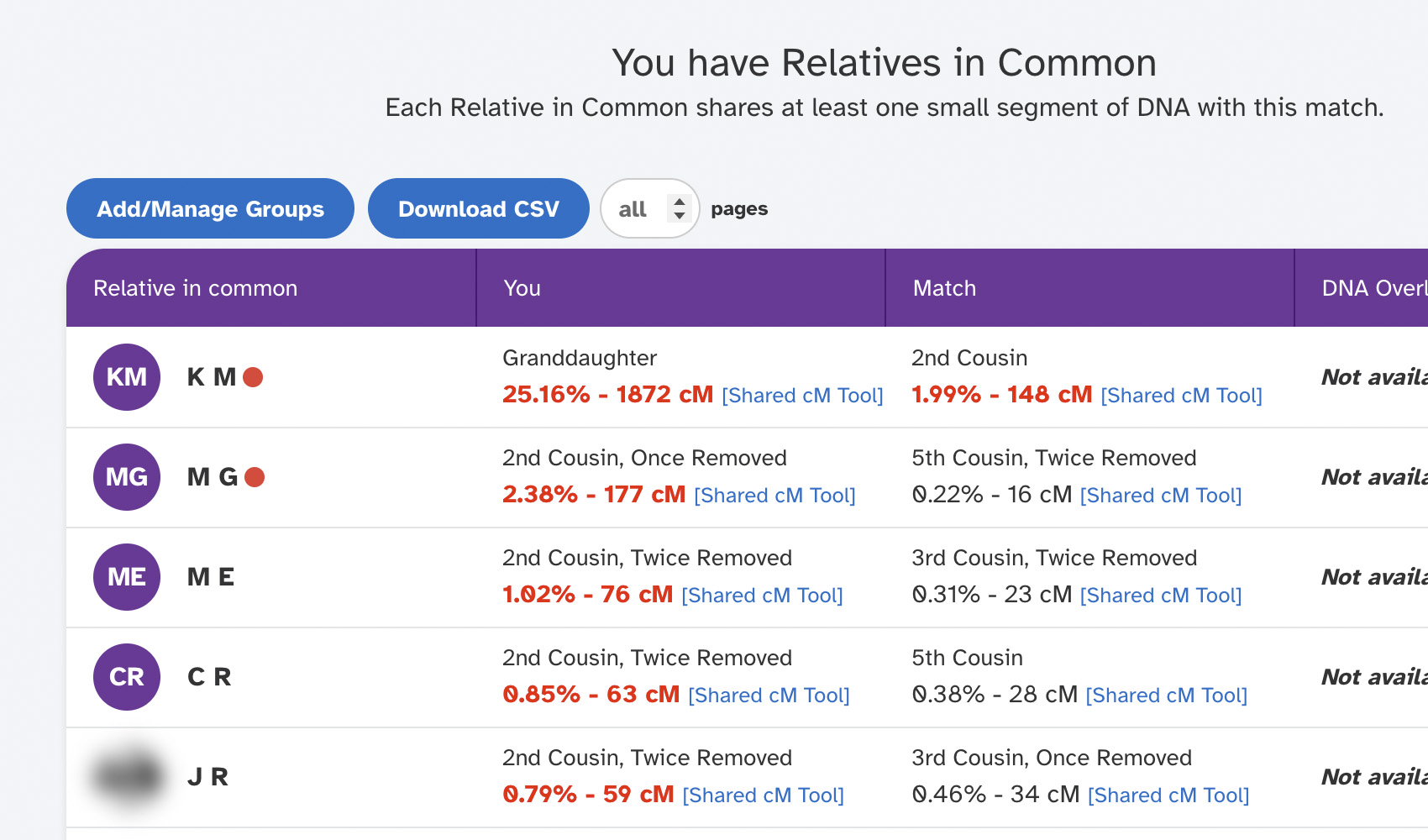
When you open the Relatives in Common list for a 23andMe match, the amount of DNA each person shares with you is given as a percentage rather than as centimorgans, which makes it hard to spot the strongest connections in the cluster. 23andMe Highlight Shared Matches 50cM+ converts each percentage into a cM value, displays it next to the percentage, and highlights anyone at or above your chosen threshold so the most significant shared relatives stand out.
How does 23andMe Highlight Shared Matches 50cM+ work?
On any 23andMe Relatives in Common page, the shared DNA percentage on every row is converted into a centimorgan value and shown alongside it. Any match whose shared cM is greater than or equal to your threshold (50 cM by default) is bolded and shown in red. A small [Shared cM Tool] link is added next to each cM value that opens DNA Painter’s Shared cM Tool in a new tab with the value already filled in. New rows are processed automatically as the page loads or as you scroll.
How do I use 23andMe Highlight Shared Matches 50cM+?
- Ensure 23andMe Highlight Shared Matches 50cM+ is enabled in the Genealogy Assistant pop-up panel.
- Open the Relatives in Common list for any 23andMe match. Each row will show its shared cM value next to the percentage, and any match at or above the threshold will be highlighted.
- Click the [Shared cM Tool] link next to any cM value to open DNA Painter’s Shared cM Tool in a new tab with the value pre-filled.
- (Optional) To change the threshold, click the settings icon next to 23andMe Highlight Shared Matches 50cM+ in the pop-up to open the advanced settings, expand the DNA Match Highlighting section, and update 23andMe Shared Matches. The setting is saved automatically.
23andMe Highlight Shared Matches 50cM+ is a feature of the software Genealogy Assistant.
Genealogy Assistant is an extension for Google Chrome, Mozilla Firefox, Microsoft Edge and Apple Safari which supercharges your family history research by adding over 100 custom features to popular genealogy websites like Ancestry, MyHeritage, FamilySearch, FamilyTreeDNA and more. You can watch a full video walkthrough on YouTube.
Install Genealogy Assistant for Google Chrome | Install for Mozilla Firefox | Install for Microsoft Edge | Install for Apple Safari