

What problem does Clusters Table Readability Enhancements solve?
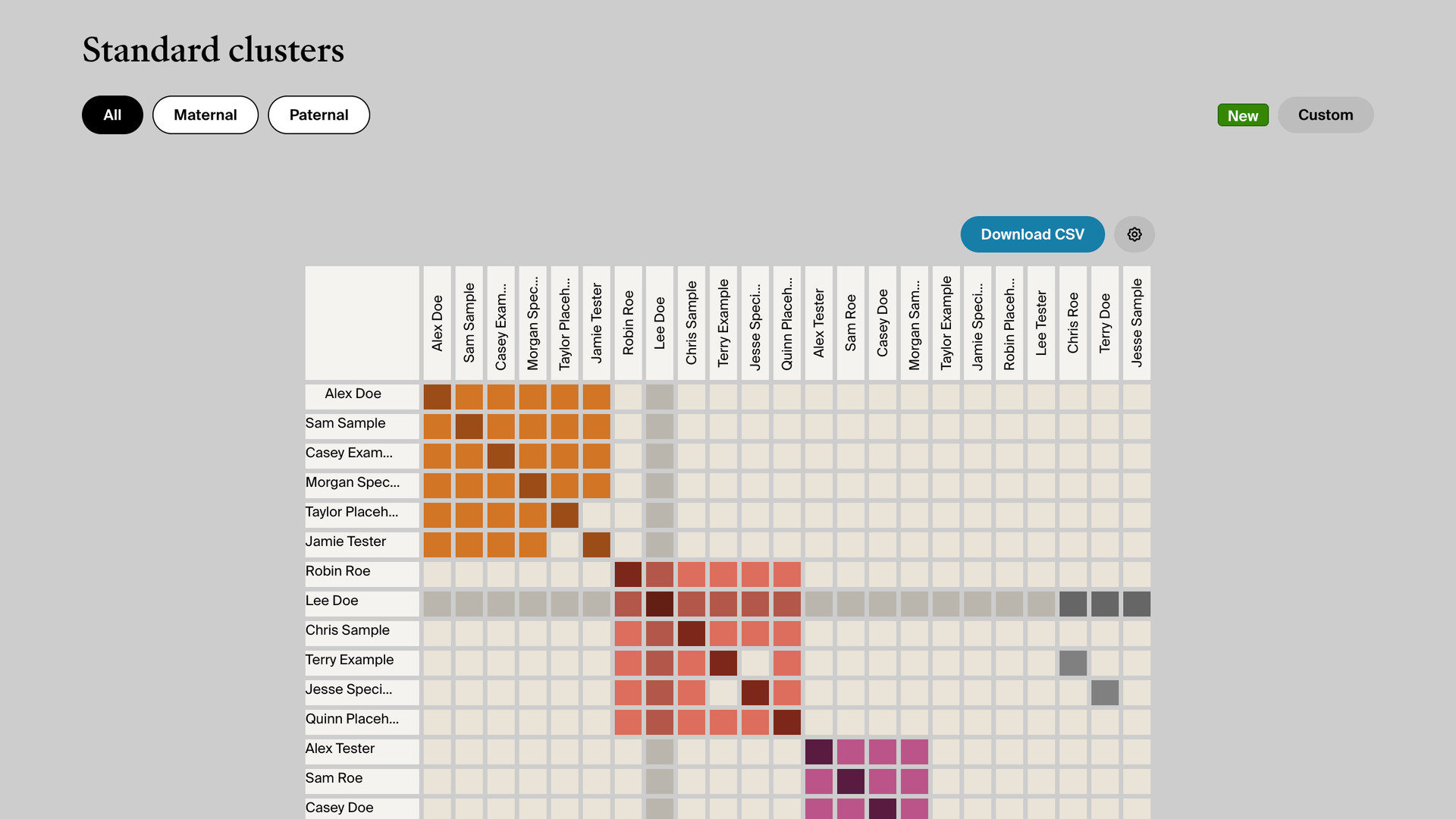
Clusters Table Readability Enhancements makes the AncestryDNA clusters grid easier to read. Each column header shows the match’s name, written straight down, and the row you point at is shaded across the grid. Without it, finding where two matches meet means tracing back from the column to the row names.
How does Clusters Table Readability Enhancements work?
On the clusters report, each column header is given the same name as its row, so it reads as the match’s name rather than initials. The headers are turned to run straight down the page, which keeps long names from overlapping each other; a very long name ends in an ellipsis.
Move the pointer over any row and it is shaded, along with that match’s column. The two meet at the match’s own square, so you can follow one match across and down the grid to every match they share DNA with. The shading clears when the pointer leaves.
When you open a cluster, the tree size of each match in the list under the grid is shown in bold. The matches with a tree worth opening are then quicker to spot. There is nothing to set up; the changes appear whenever you open the report.
How do I use Clusters Table Readability Enhancements?
- In the Genealogy Assistant pop-up panel, make sure Clusters Table Enhancements is turned on.
- Open your AncestryDNA clusters report. Each column header shows a match’s full name.
- Move the pointer over a row in the grid. The row and that match’s column are shaded.
Related features
- Download Clusters as CSV File: Save every pair of matches that share DNA in your Ancestry clusters grid to a CSV file, for the whole report or just the cluster you have open.
- Highlight Shared Matches by cM: Highlights shared matches who share 25 cM or more with you, and matches of matches who share 50 cM or more, with both thresholds yours to change.
- Open Shared Matches from Match Name: Clicking a name in your DNA matches list opens that match’s shared matches, and clicking their photo opens their trees.
Clusters Table Readability Enhancements is a feature of the software Genealogy Assistant.
Genealogy Assistant is an extension for Google Chrome, Mozilla Firefox, Microsoft Edge and Apple Safari which supercharges your family history research by adding over 100 custom features to popular genealogy websites like Ancestry, MyHeritage, FamilySearch, FamilyTreeDNA and more.
Install Genealogy Assistant for Google Chrome | Install for Mozilla Firefox | Install for Microsoft Edge | Install for Apple Safari