


What problem does 23andMe Download Matches Pages as CSV File solve?
23andMe does not provide a way to export your DNA Relatives list, which makes it difficult to work with your matches outside of the website or to compare different snapshots over time. 23andMe Download Matches Pages as CSV File adds a one-click download button to the DNA Relatives page that walks through your match list and saves the results to a CSV file with cM values, relationships, and group assignments included.
How does 23andMe Download Matches Pages as CSV File work?
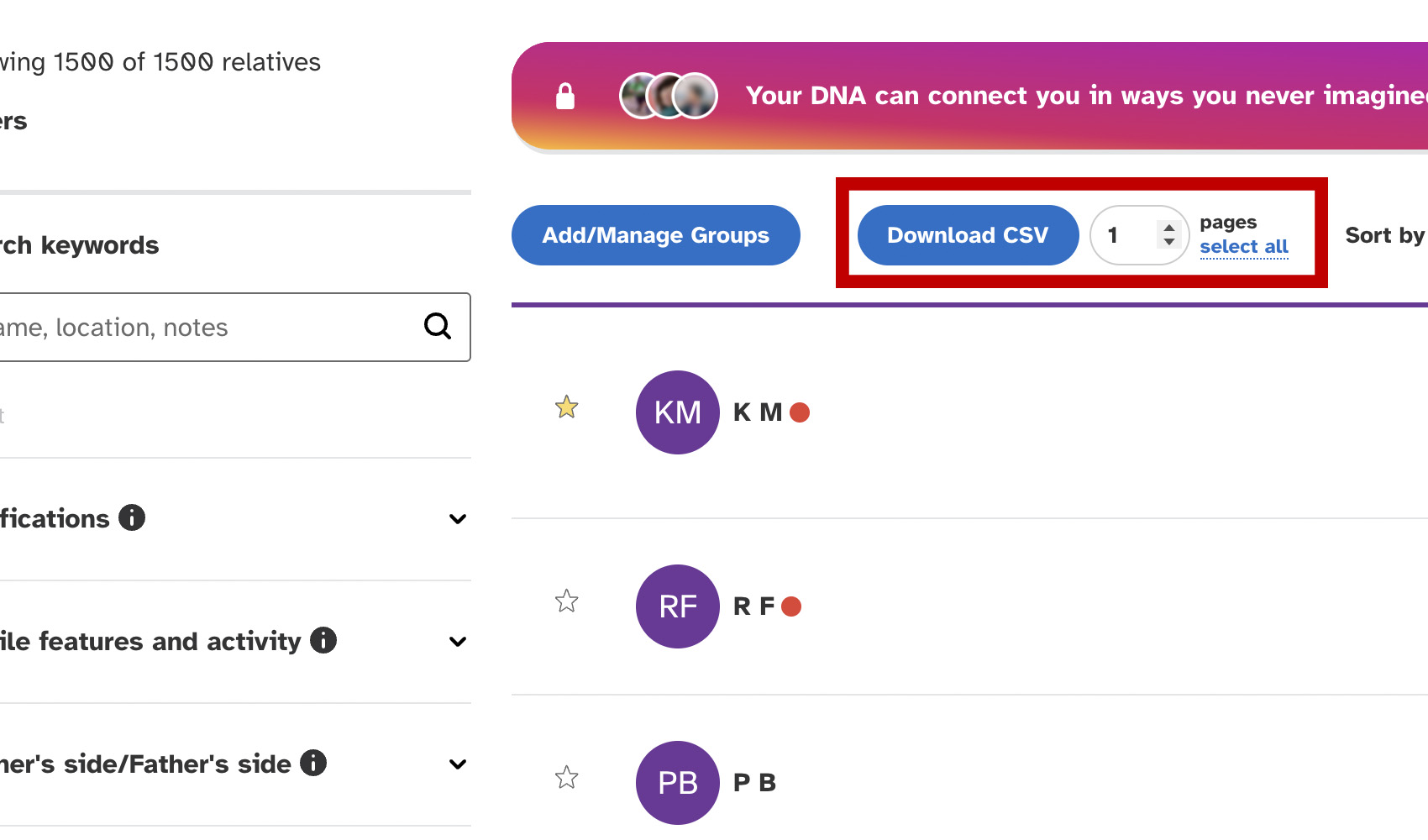
On your 23andMe DNA Relatives page, a Download CSV button is added to the toolbar above the matches list, along with a box where you choose how many pages to download and a gear icon labelled Download Settings. Click select all under the box to fill in every page from the one you are on.
The download follows the list on screen, with your filters and sort order, starting from the page you are on. Your matches are read straight from 23andMe in a handful of requests, however long the list, which keeps your account well clear of the limits 23andMe puts on requests.
A progress overlay shows the download, with a Cancel button to stop at any time. The filename includes the tester’s name and ID so you can keep downloads for different kits separate. Click the gear icon to change the download method or download speed.
How do I use 23andMe Download Matches Pages as CSV File?
- Ensure 23andMe Download Matches Pages as CSV File is enabled in the Genealogy Assistant pop-up panel.
- Open your 23andMe DNA Relatives list and apply any filters or sort order you want the download to follow.
- Enter the number of pages you want to download in the box next to the Download CSV button, or click select all to include every page from the one you are on.
- Click Download CSV. Click Cancel in the progress overlay to stop early.
- When the download completes, the CSV file will be saved to your downloads folder.
- (Optional) To change the speed of the download, click the gear icon beside Download CSV, choose a slower Download speed and click Save & Close.
CSV Columns
- Match Name
- Shared cM
- Shared Percentage
- Shared Segments
- Estimated Relationship
- Star Status
- Groups
- Match GUID
- Match URL
- Longest Segment cM
- Relationship Range
- Predicted Relationship
- Side
- Opted In
- Notes
- Sex
- Location
- Family Surnames
- Family Locations
- Maternal Grandmother Birthplace
- Maternal Grandfather Birthplace
- Paternal Grandmother Birthplace
- Paternal Grandfather Birthplace
- Connection
- Messaged
- Open Sharing
- In Your Tree
- Last Active
- Maternal Haplogroup
- Paternal Haplogroup
- FamilySearch
Longest Segment cM is the longest piece of DNA you share, Relationship Range lists the relationships 23andMe considers possible, and Predicted Relationship is its own prediction before any change you have made to it.
Side shows whether the match is on your mother’s or father’s side, where 23andMe can tell. Sex, Location, Family Surnames, Family Locations and the four grandparent birthplaces are what the match has shared on their profile, and Opted In is the date they joined DNA Relatives.
Connection shows whether you are connected or have an invitation waiting, Messaged reads Yes once you have exchanged messages, and In Your Tree links to the match in your 23andMe family tree. Last Active and the haplogroups depend on your 23andMe membership and are blank when it does not include them.
NOTICE: CSV DOWNLOAD TOOLS ARE FOR PERSONAL RESEARCH PROJECTS ONLY.
23andMe Download Matches Pages as CSV File is a feature of the software Genealogy Assistant.
Genealogy Assistant is an extension for Google Chrome, Mozilla Firefox, Microsoft Edge and Apple Safari which supercharges your family history research by adding over 100 custom features to popular genealogy websites like Ancestry, MyHeritage, FamilySearch, FamilyTreeDNA and more. You can watch a full video walkthrough on YouTube.
Install Genealogy Assistant for Google Chrome | Install for Mozilla Firefox | Install for Microsoft Edge | Install for Apple Safari