


What problem does Surname Comparison Tool solve?
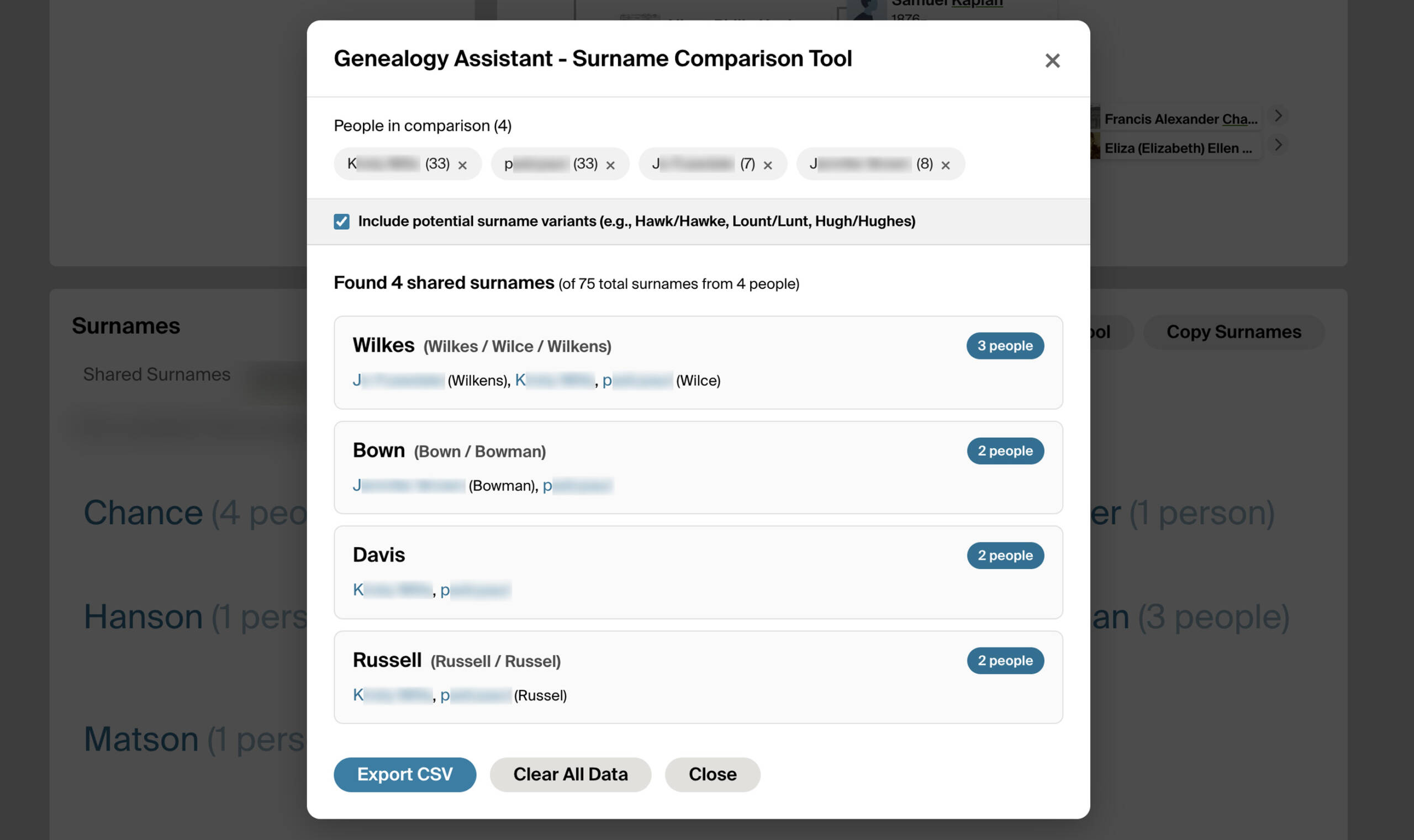
When you are trying to work out how a DNA match connects to you, the quickest clue is usually a shared surname between your trees. There is no built-in way on Ancestry to compare surnames across multiple matches at once. You end up opening each tree, reading the surname list, and trying to remember what you saw on the last one. Surname Comparison Tool gives you a single panel that shows every surname shared between any group of matches you pick, with phonetic matching so spelling variants still line up.
How does Surname Comparison Tool work?
The Surname Comparison Tool is a single panel that collects surname lists from every DNA match and tree you add to it. Matches are added from three places: the + Compare button on a match’s Compare Trees page, the + Compare button on any Ancestry tree, and the Compare Trees button on any shared matches page (which scans every shared match’s tree in the background). Once you open the panel, every shared surname is listed with the people who carry it, the number of matches it appears in, and a link to each person’s tree. A Include potential surname variants checkbox turns phonetic matching on or off so variants like Hawk/Hawke and Hugh/Hughes group together. Export CSV saves the comparison to a file and Clear All Data empties the panel so you can start a fresh comparison.
How do I use Surname Comparison Tool?
- Add matches to the tool from one of three places: click + Compare on a DNA match’s Compare Trees page, click + Compare on any Ancestry tree, or open a match’s shared matches page and click Compare Trees to scan every shared match at once.
- Open the panel with View Surname Comparison Tool on any of those pages, or open the Genealogy Assistant pop-up and click Launch Surname Comparison Tool in the Ancestry Tools section.
- Review the list of shared surnames. Tick Include potential surname variants to group phonetic variants, or untick it for strict matching.
- Click Export CSV to save the comparison to a file, or Clear All Data to empty the panel.
- To configure whether the tool processes public unlinked trees when scanning shared matches, open the Genealogy Assistant pop-up, click the settings icon next to Add Shared Matches to Surname Tool, and find the Surname Comparison Tool section. Tick Also check unlinked trees to include public unlinked trees and set the Maximum unlinked tree size to skip very large trees. Settings save automatically.
Related features
- Add Shared Matches to Surname Tool: A Compare All Trees button visits every shared match with a public linked tree and adds their surnames to the Surname Comparison Tool for you.
- Copy Surnames from Family Tree: Copy every surname in a match’s tree to your clipboard, comma-separated, with one button on the trees tab.
- Add All People Link to Matches Trees: A View all people in tree link beside the size of each match’s linked tree opens its full list of people.
Surname Comparison Tool is a feature of the software Genealogy Assistant.
Genealogy Assistant is an extension for Google Chrome, Mozilla Firefox, Microsoft Edge and Apple Safari which supercharges your family history research by adding over 100 custom features to popular genealogy websites like Ancestry, MyHeritage, FamilySearch, FamilyTreeDNA and more. You can watch a full video walkthrough on YouTube.
Install Genealogy Assistant for Google Chrome | Install for Mozilla Firefox | Install for Microsoft Edge | Install for Apple Safari