

What problem does Segment Stats on DNA Match Pages solve?
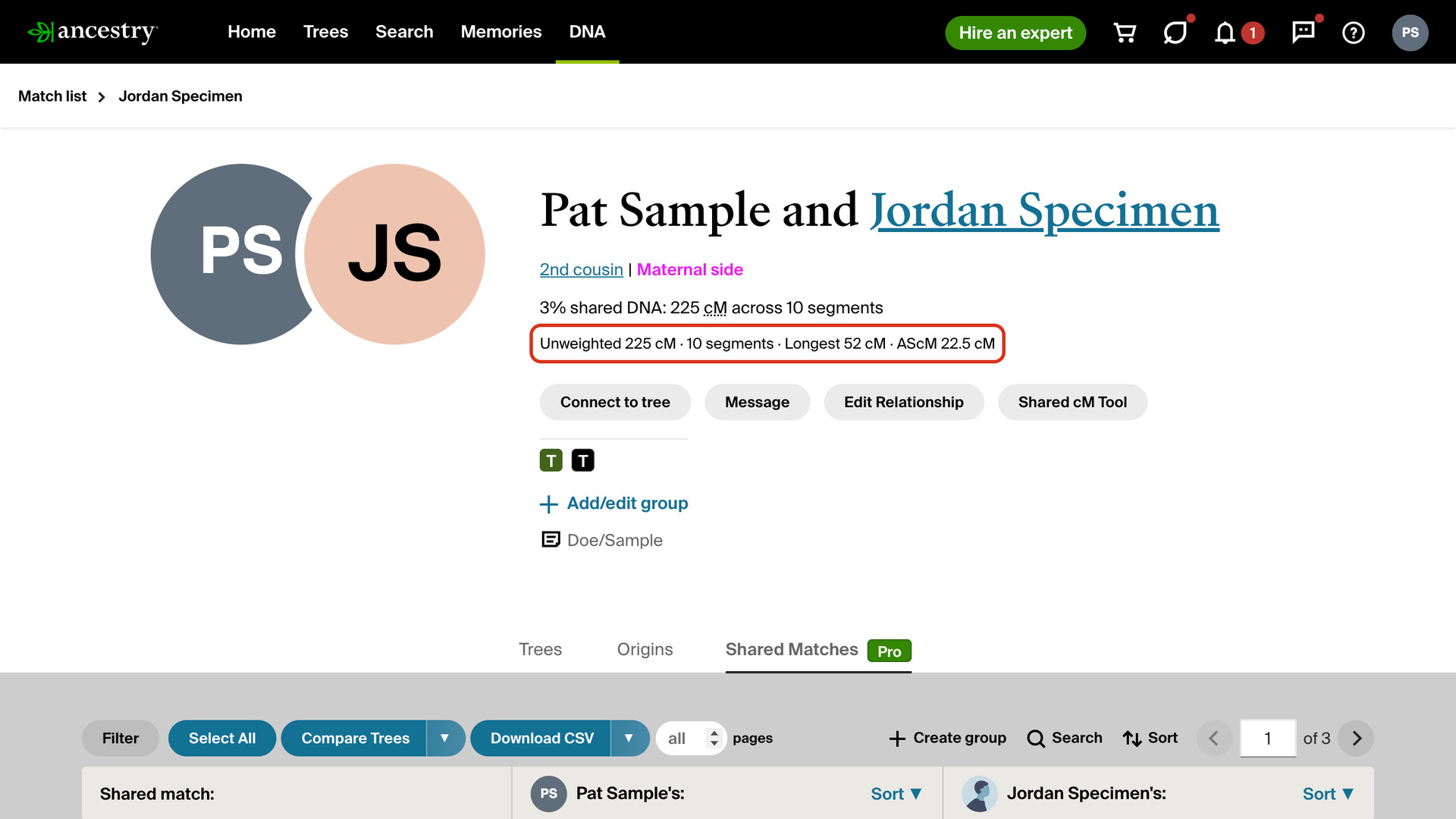
Segment Stats on DNA Match Pages adds a line of segment figures under the shared DNA amount at the top of every AncestryDNA match page. Ancestry keeps the unweighted cM and the longest segment inside the Shared DNA pop-up, one match at a time, and never shows the average segment size.
How does Segment Stats on DNA Match Pages work?
The line under the shared DNA amount shows four figures:
- Unweighted: the DNA you share, in cM, before Ancestry removes segments common to a whole population.
- The number of segments you share.
- Longest: the longest segment you share, in cM.
- AScM: the average segment size, which is the unweighted cM divided by the number of segments.
On a strong match it reads, for example, Unweighted 225 cM · 10 segments · Longest 52 cM · AScM 22.5 cM. The line stays at the top of the page on every tab of the match. Hover over it to see how the average is worked out, or click AScM to open a video explaining it.
Ancestry’s Timber filter removes segments it considers common to a whole population, so the unweighted figure can be higher than the shared cM in your match list. Ancestry counts segments and measures the longest one on the unweighted DNA, so the average uses the unweighted total too.
With endogamous ancestry, matches share many small segments from the same population, so the longest segment and the average tell you more than the total. One long segment and a high average point to a closer cousin than the same total spread over dozens of small pieces.
Gil Bardige, who coined the term AScM, explains his method in the JewishGen Talks webinar Help! I Got My DNA Results and I’m Confused. He starts with matches sharing 90 cM or more, then picks those with a longest segment of 20 cM or more and an AScM of 12 cM or more.
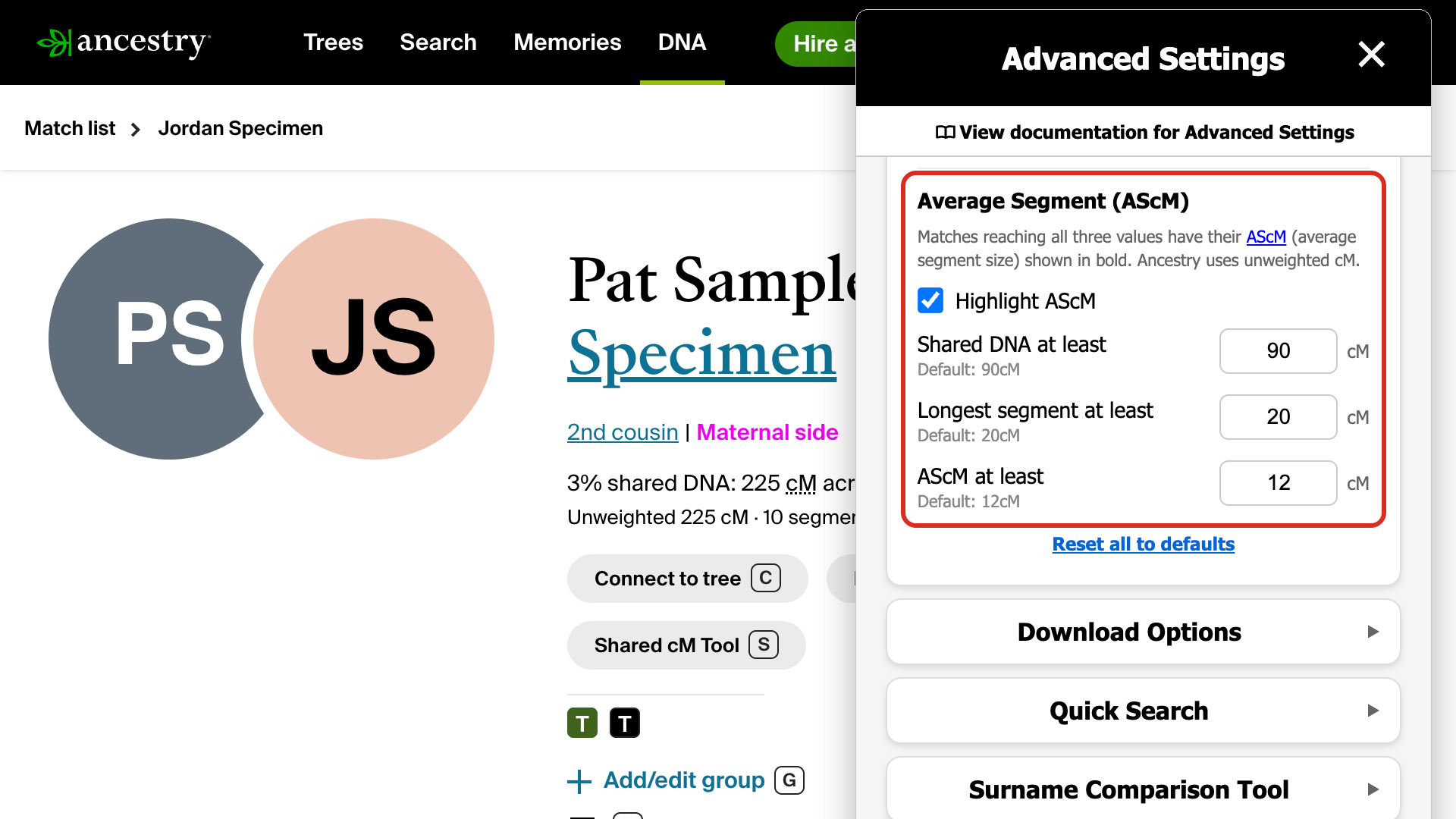
Genealogy Assistant can mark those matches for you. With Highlight AScM ticked in Advanced Settings, the AScM is shown in bold when a match reaches all three values, and hovering over the line says so. You can change the three values there.
The same figures can go in your CSV files. Tick Ancestry additional DNA details in the download settings. Download Matches Pages as CSV File and Download Shared Matches as CSV then add columns for the unweighted cM, longest segment and average segment size.
How do I use Segment Stats on DNA Match Pages?
- In the Genealogy Assistant pop-up panel, make sure Segment Stats on DNA Match Pages is turned on.
- Open a match from your AncestryDNA match list or from a Shared Matches tab. The segment figures are under the shared DNA amount at the top of the page.
- Hover over the line to see how the average is worked out, or click AScM to watch Gil Bardige explain it.
- To have the AScM shown in bold, click Edit advanced settings at the bottom of the pop-up panel. Advanced Settings opens.
- Click DNA Match Highlighting to open that section, if it is closed.
- Under Average Segment (AScM), tick Highlight AScM. Three boxes appear below it, filled in with 90, 20 and 12 cM.
- To change a value, type a new number in Shared DNA at least, Longest segment at least or AScM at least. It saves as soon as you click away from the box.
- Reload the match page. If the match reaches all three values, its AScM is shown in bold.
Related features
- FamilyTreeDNA: AScM on Match Lists: Adds the average segment size (AScM) to FamilyTreeDNA’s Chromosome Browser and Family Finder match lists, with the segment count the Family Finder list leaves out.
- Highlight DNA Matches by cM: Shows matches above 25 cM, or a threshold you choose, in bold red, with maternal matches in pink, paternal matches in blue and public linked trees in green.
- Download Matches Pages as CSV File: Download your Ancestry DNA matches to a CSV file, as many pages as you choose, following the filters and sort order you have on screen.
Segment Stats on DNA Match Pages is a feature of the software Genealogy Assistant.
Genealogy Assistant is an extension for Google Chrome, Mozilla Firefox, Microsoft Edge and Apple Safari which supercharges your family history research by adding over 100 custom features to popular genealogy websites like Ancestry, MyHeritage, FamilySearch, FamilyTreeDNA and more.
Install Genealogy Assistant for Google Chrome | Install for Mozilla Firefox | Install for Microsoft Edge | Install for Apple Safari