

What problem does FamilySearch Add Advanced Search to Profiles solve?
FamilySearch Add Advanced Search to Profiles adds the searches FamilySearch does not offer to its person and record pages. They cover the civil registration indexes, WikiTree, Find a Grave and Newspapers.com, filled in from the person. Without it, each of those searches means typing the name, years and places again.
How does FamilySearch Add Advanced Search to Profiles work?
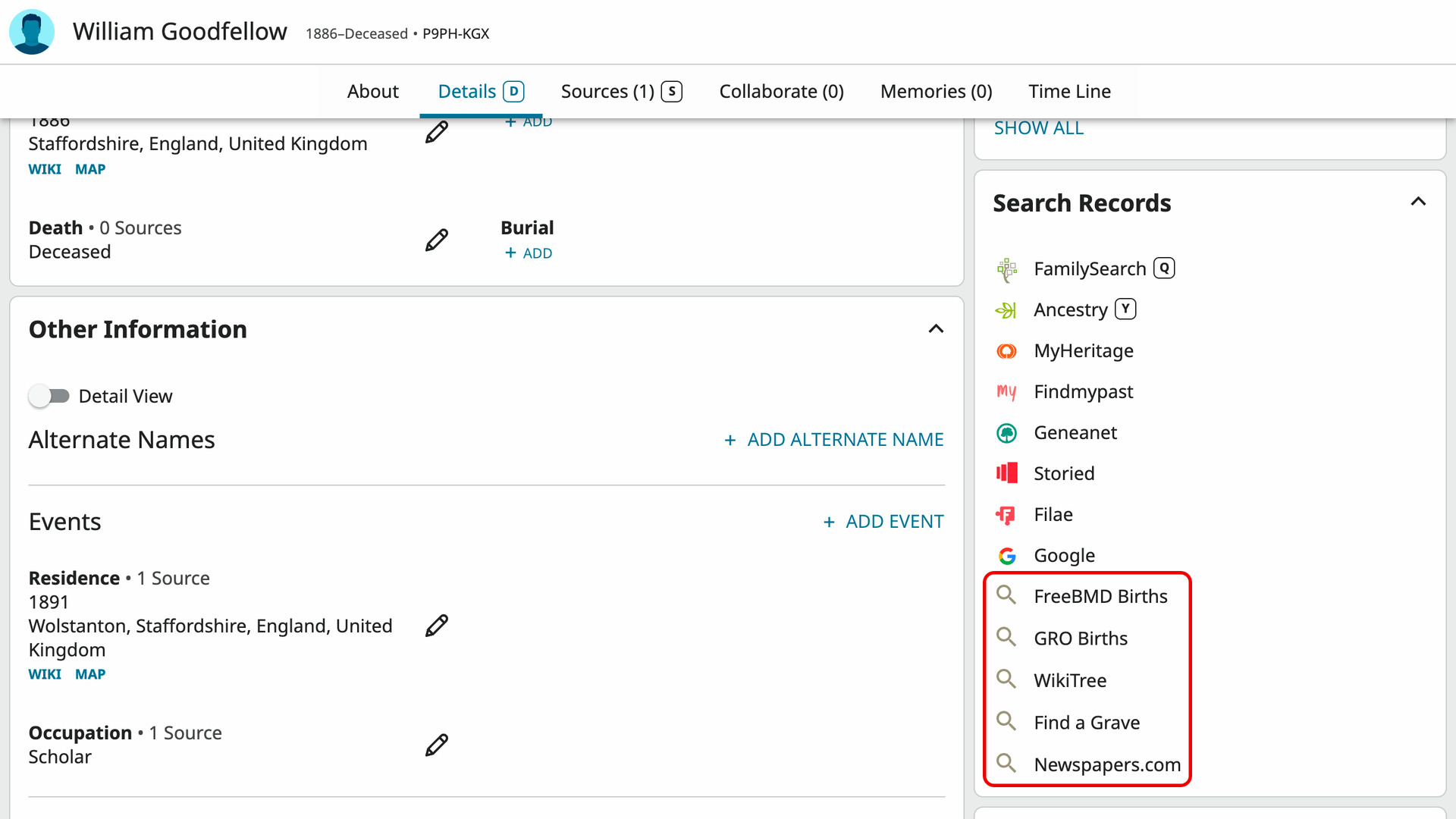
On a FamilySearch person page, the Search Records card lists searches of FamilySearch and of other sites such as Ancestry and MyHeritage. New rows are added at the bottom of the card, each with a grey magnifier where the other rows have a site logo. Each row opens its search in a new tab.
The first new rows are the civil registration indexes that cover the person’s birth or death place and the year of the event. Each is named for its index and the event, such as FreeBMD Births or GRO Deaths. WikiTree, Find a Grave and Newspapers.com come last and show for every person.
Each search is filled in with the person’s name and their birth and death years and places. A civil registration row opens that site’s own search and runs it for you. Where the index records them, it adds the sex, the mother’s maiden name or the parents’ first names. WikiTree’s search form is filled in and run for you too.
A row is left out when its index is closed for that year, such as a birth less than 100 years old on most registries. A row that shows is one worth clicking. These are the indexes, with the years each one covers:
- FreeBMD, for England and Wales, searches the FreeBMD index of births and deaths (1837 to 2000), adding the mother’s maiden name on births from 1911.
- GRO, for England and Wales, searches the General Register Office index of births (1837 to 1934, and 1984 on) and deaths (1837 to 1957, and 1984 on). It adds the sex, the mother’s maiden name on births and the age on deaths.
- ScotlandsPeople, for Scotland, searches the statutory registers (from 1855) or the old parish registers (1553 to 1854) by name, sex and year. Births show once 100 years old and deaths once 50.
- IrishGenealogy, for Ireland and for Northern Ireland before 1922, searches the civil records of births (from 1864) and deaths (from 1871). Births show once 100 years old and deaths once 50.
- NSW BDM, for New South Wales, searches the family history index (from 1788) by name, year and parents’ first names. Births show once 100 years old and deaths once 30.
- Qld BDM, for Queensland, searches the family history index (from 1829) by name, year and parents’ first names. Births show once 100 years old and deaths once 30.
- Vic BDM, for Victoria, searches the family history index (from 1836) by name and year. Births show once 100 years old and deaths once 30.
- WA BDM, for Western Australia, searches the online index of births (1841 to 1925) and deaths (1841 to 1995) by name, year and parents’ first names.
- Tas Names, for Tasmania, searches the Libraries Tasmania Names Index of births (1803 to 1933) and deaths (1803 to 1939) by name.
- NZ BDM, for New Zealand, searches the historical records index (from 1848) by name and year. A birth shows once 100 years old, or once 80 years old or 50 years after the death for someone who has died. A death shows once 50 years old or 80 years after the birth.
- NS Archives, for Nova Scotia, searches the provincial vital statistics of births (1864 to 1924) and deaths (1864 to 1974) by name and year.
- NB Archives, for New Brunswick, searches the provincial vital statistics (from 1800) by name, year and parents’ first names. Births show once 95 years old and deaths once 50.
- BC Archives, for British Columbia, searches the genealogy index of births (from 1854) and deaths (from 1872) by name and year. Births show after 122 years and deaths after 21.
- MB Vital Stats, for Manitoba, searches the provincial index (from 1882) by name and year. Births show once 100 years old and deaths once 70.
The GRO index needs a free GRO account, and the site signs you out after a short while. If you are signed out when you click a GRO row, its login page opens with a note naming the waiting search. The search runs as soon as you sign in.
The GRO also needs the sex. When FamilySearch has none for the person, the GRO form is filled in but left for you to choose the sex and click Search. ScotlandsPeople searches need you signed in to your ScotlandsPeople account, and IrishGenealogy asks you to accept its declaration once before its searches run.
A record page has no Search Records card, so a Search Other Sites button is added under Search Full Text in the Still Looking? section. Click it and it reads Reading the record… for a moment, then gives way to a list of the same searches.
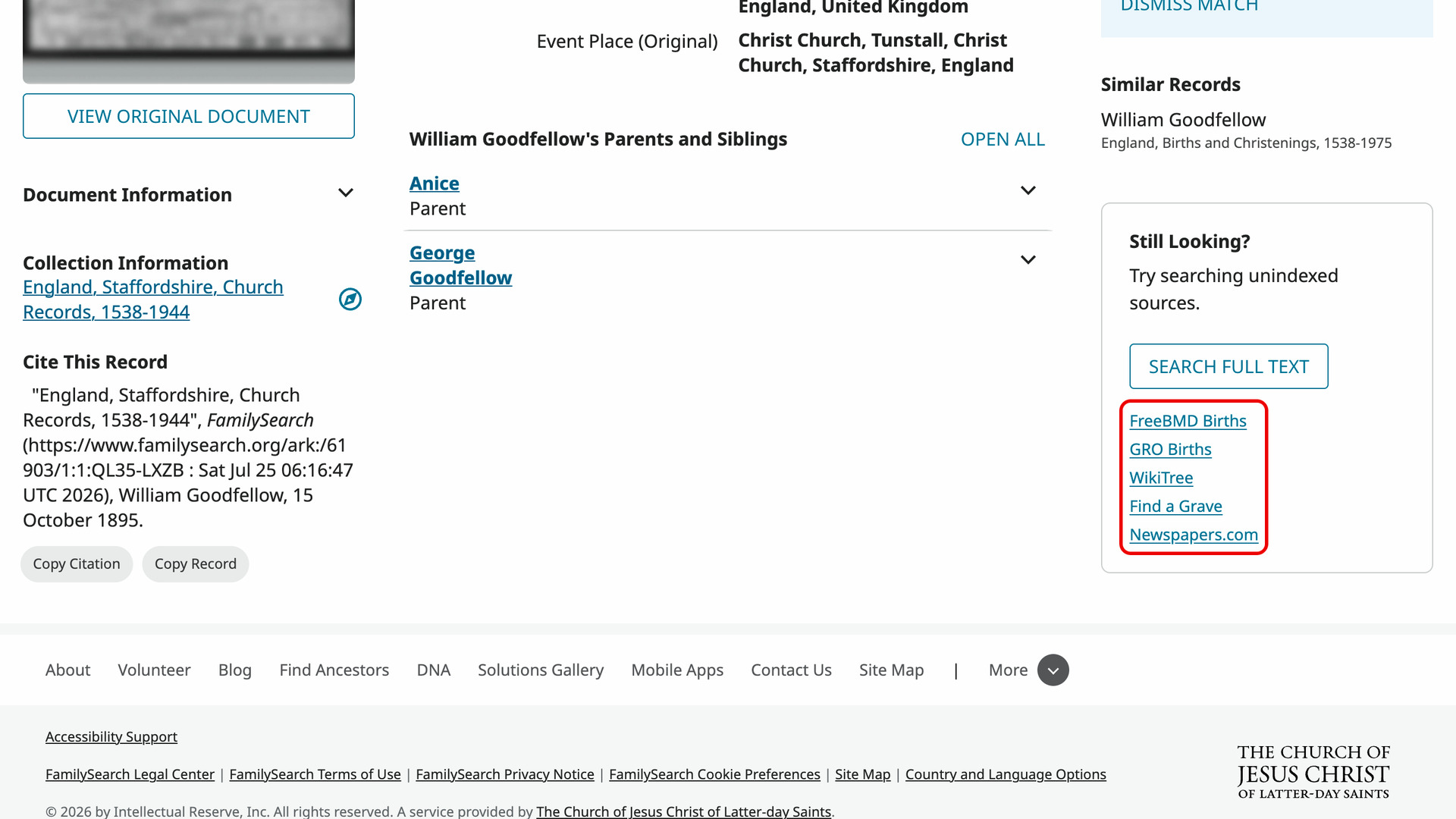
Those searches are filled in from the person the record is about: their name, sex, birth and death years and places, and parents. When the record has no birth or death, it uses the christening, baptism or burial instead. Each search in the list opens in a new tab. There is nothing to set up.
How do I use FamilySearch Add Advanced Search to Profiles?
The FamilySearch tree and records need you to be signed in to a free FamilySearch account.
- In the Genealogy Assistant pop-up panel, make sure Add Advanced Search to Profiles is turned on.
- Open a person page in the FamilySearch tree. The new rows appear at the bottom of the Search Records card.
- Click a row such as WikiTree or FreeBMD Births. The search opens in a new tab.
- To search from a record, open a record page on FamilySearch.
- Under Search Full Text, click Search Other Sites. The list of searches takes its place.
- Click a search in the list. It opens in a new tab.
Related features
- Add Advanced Search to Profiles: Search anyone in your Ancestry tree on eight genealogy websites from their profile, with civil registration indexes beside each place and an age added to the death date.
- FamilySearch: Add Wiki and Map Links to Places: Wiki and Map links under each place on a FamilySearch person page open that place’s own FamilySearch Wiki page or show it in Google Maps.
- FamilySearch: Add Keyboard Shortcuts to Family Tree: Open, centre or search anyone on the FamilySearch tree with one key as you point at them, and reach a person page’s main buttons and tabs by letter.
FamilySearch Add Advanced Search to Profiles is a feature of the software Genealogy Assistant.
Genealogy Assistant is an extension for Google Chrome, Mozilla Firefox, Microsoft Edge and Apple Safari which supercharges your family history research by adding over 100 custom features to popular genealogy websites like Ancestry, MyHeritage, FamilySearch, FamilyTreeDNA and more.
Install Genealogy Assistant for Google Chrome | Install for Mozilla Firefox | Install for Microsoft Edge | Install for Apple Safari