

What problem does FamilySearch Index Family Tree in Quick Search solve?
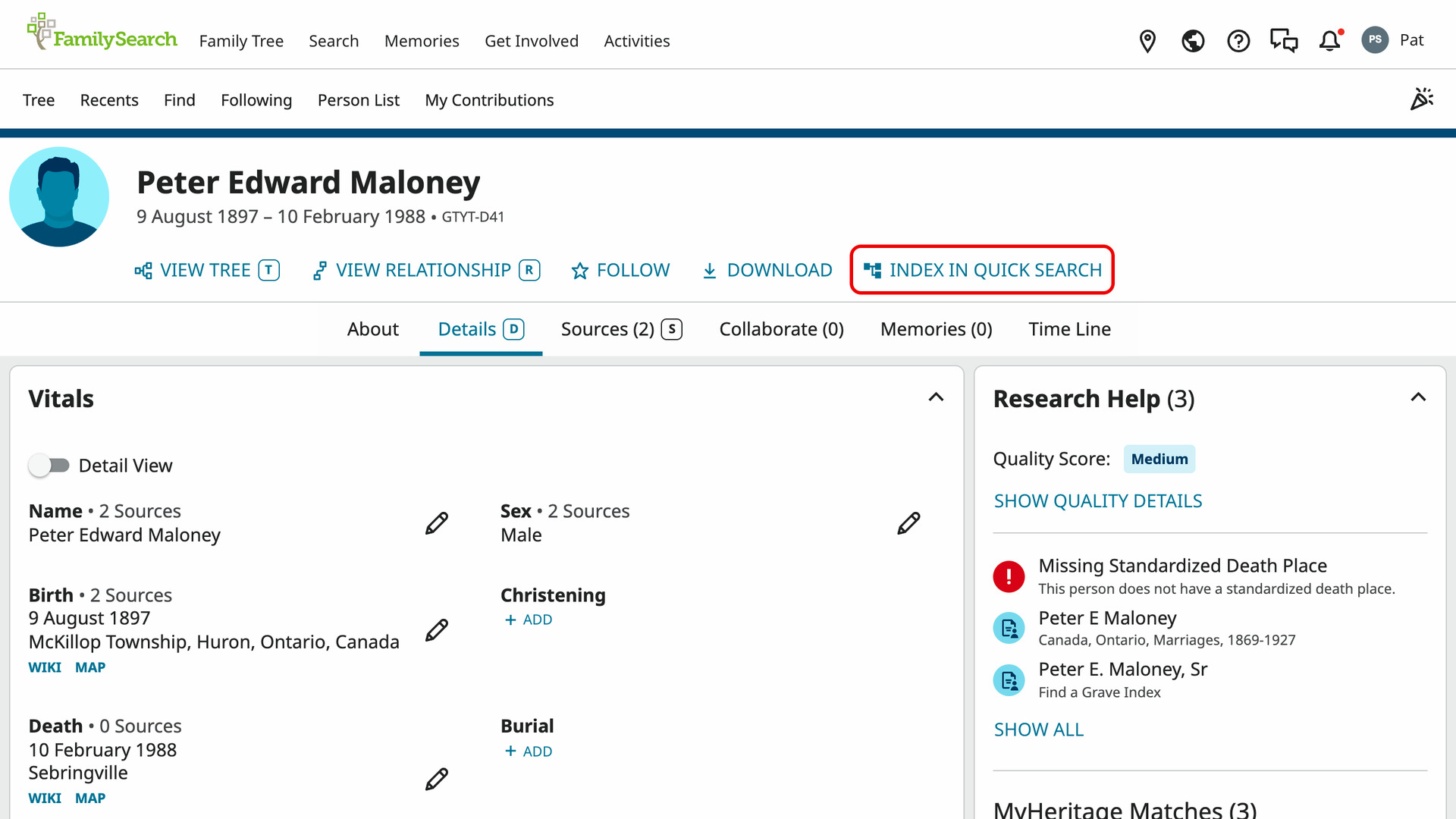
FamilySearch Index Family Tree in Quick Search adds an Index in Quick Search link to FamilySearch person pages. It saves your ancestors from the FamilySearch Family Tree, so you can open any of them by typing their name into Quick Search. The DNA tools on Ancestry then count them as your tree too.
How does FamilySearch Index Family Tree in Quick Search work?
The link sits after View Tree, View Relationship and Follow at the top of a person page. Click it on your own page, or the page of someone whose DNA test you manage. The link reads Reading… for a moment while their ancestors to 10 generations are read.
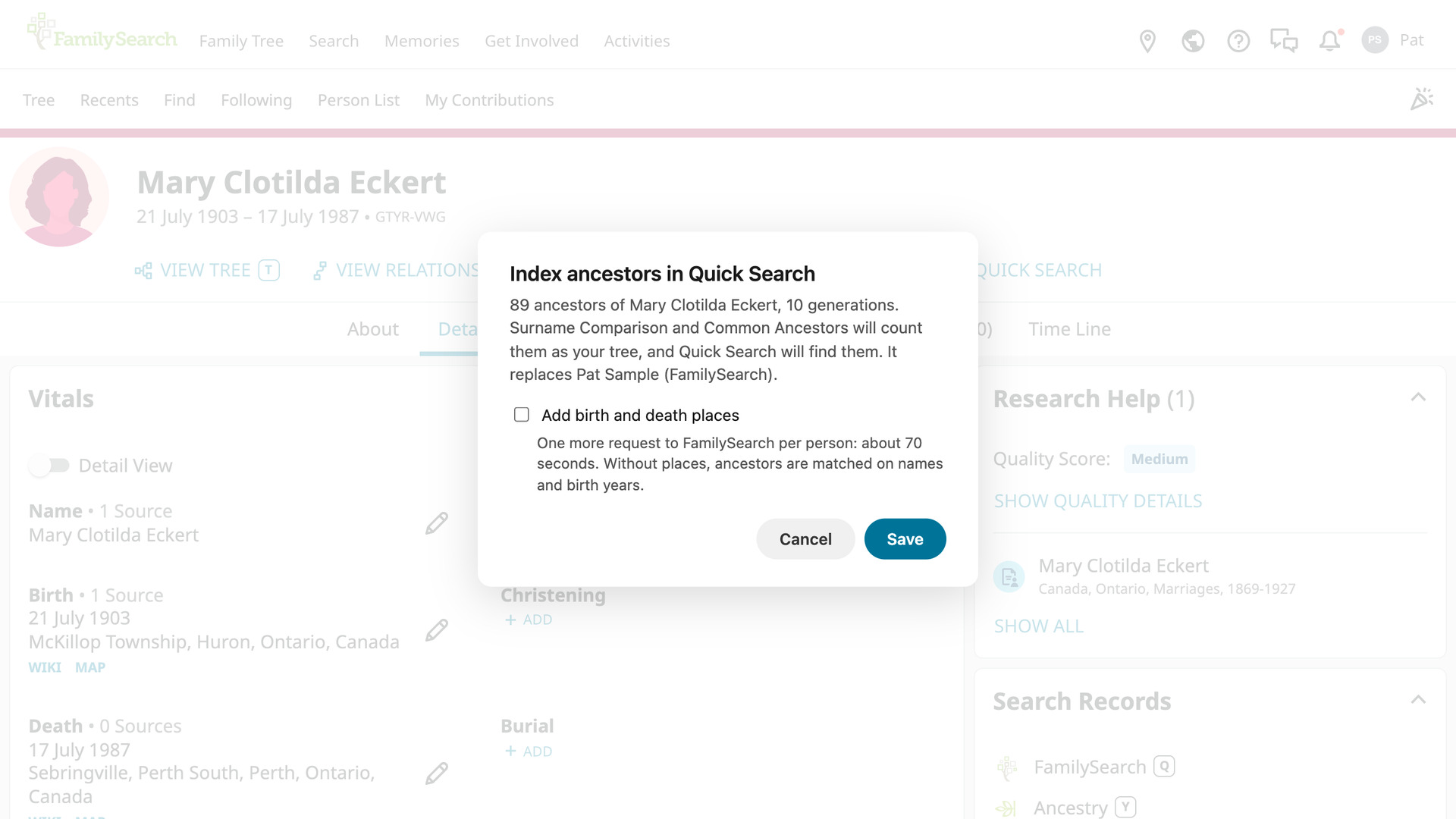
The Index ancestors in Quick Search window then says how many ancestors were found. Without places, ancestors are matched on names and birth years. Tick Add birth and death places to add them. The window shows how long that takes first, often a few minutes.
With places ticked, a progress window counts the ancestors done and the time left, and the tab title shows the same count. Stop and save saves the ancestors with the places read so far. When it is done, the link reads Saved 207 ancestors, or however many there are. On that person’s page it then reads Reindex.
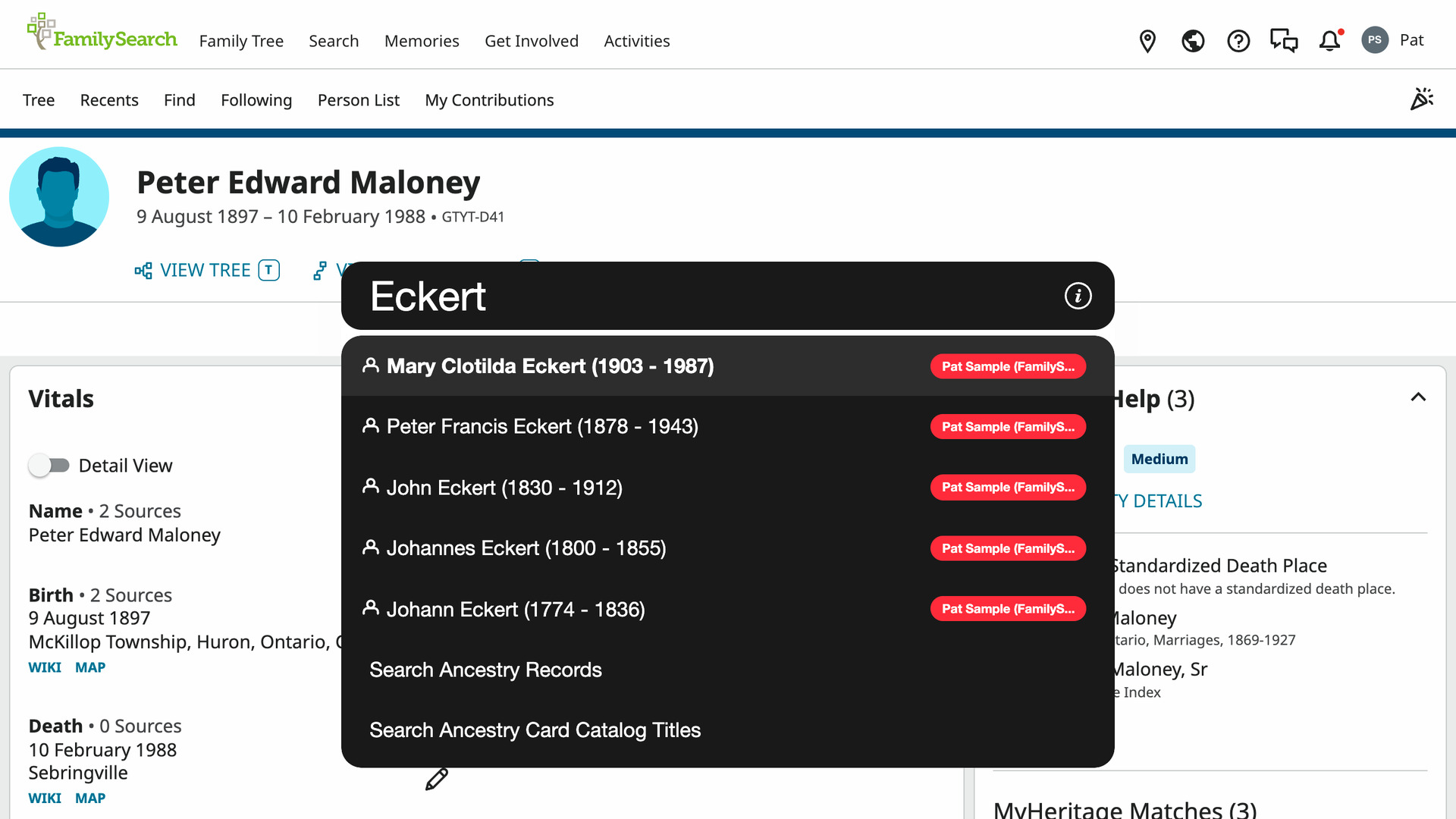
Every saved ancestor then appears in Quick Search results, and clicking one opens their FamilySearch person page. Once you have more than one tree there, each person shows their tree’s name in a coloured label. The tree is named after the person whose page you used, with (FamilySearch) added if another tree has that name.
When you type a people search prefix and a name, your FamilySearch ancestors are offered underneath, along with the people from your other trees. Choosing one fills in their birth and death years, and their places too if you added them.
The Surname Comparison Tool on Ancestry counts them as your own tree. Its In your tree column shows how many generations back each surname is among your FamilySearch ancestors. Surnames your matches share with them stand out even when no tree is linked to your DNA test.
Common ancestors, part of Save DNA Match Trees as GEDCOM, checks them too. An ancestor your matches share who is also one of your FamilySearch ancestors reads Your ancestor in its In your tree column, with their generation. That picks out which shared ancestors are on your own line.
One FamilySearch tree is kept at a time, so indexing someone else replaces it, and the window names the tree it replaces before you save. It counts toward the 10 trees Quick Search holds. If you already have 10, the link reads Quick Search full.
Unlike an Ancestry tree, the saved ancestors are not updated by themselves. After you add ancestors on FamilySearch, open the same person page and click Reindex, which reads them again and replaces what was saved. Other person pages keep showing Index in Quick Search.
How do I use FamilySearch Index Family Tree in Quick Search?
- In the Genealogy Assistant pop-up panel, make sure Index Family Tree in Quick Search is turned on.
- Open your own person page in the FamilySearch Family Tree.
- Click Index in Quick Search. The Index ancestors in Quick Search window opens.
- To add places, tick Add birth and death places.
- Click Save. The link shows how many ancestors were saved, then reads Reindex.
- Open Quick Search with
Alt+Q(Option+Qon a Mac) and type a name. Your FamilySearch ancestors appear in the results; click one to open their person page. - To remove them from Quick Search, click the settings icon next to Quick Search via Alt + Q in the pop-up panel. Advanced Settings opens at Quick Search.
- Under Trees, find the tree labelled FS under Added to Quick Search.
- Untick it. It is removed as soon as you click.
- Click Reindex on the same person page whenever you want the saved ancestors brought up to date.
Related features
- Index Ancestry Family Tree in Quick Search: Index the people in a family tree once and you can open any of their profiles by typing a name into Quick Search, with the index kept up to date for you.
- Quick Search via Alt + Q: Press Alt + Q on any web page and type a census year, a place or a record type to go straight to the matching collection in the Ancestry Card Catalog.
- FamilySearch: Save Family Tree as CSV or GEDCOM: Save a person’s descendants, ancestors or close family from the FamilySearch Family Tree as a CSV, GEDCOM or ahnentafel file, with full dates and places if you want.
FamilySearch Index Family Tree in Quick Search is a feature of the software Genealogy Assistant.
Genealogy Assistant is an extension for Google Chrome, Mozilla Firefox, Microsoft Edge and Apple Safari which supercharges your family history research by adding over 100 custom features to popular genealogy websites like Ancestry, MyHeritage, FamilySearch, FamilyTreeDNA and more.
Install Genealogy Assistant for Google Chrome | Install for Mozilla Firefox | Install for Microsoft Edge | Install for Apple Safari