

What problem does Fade Tree Arrows With No Parents solve?
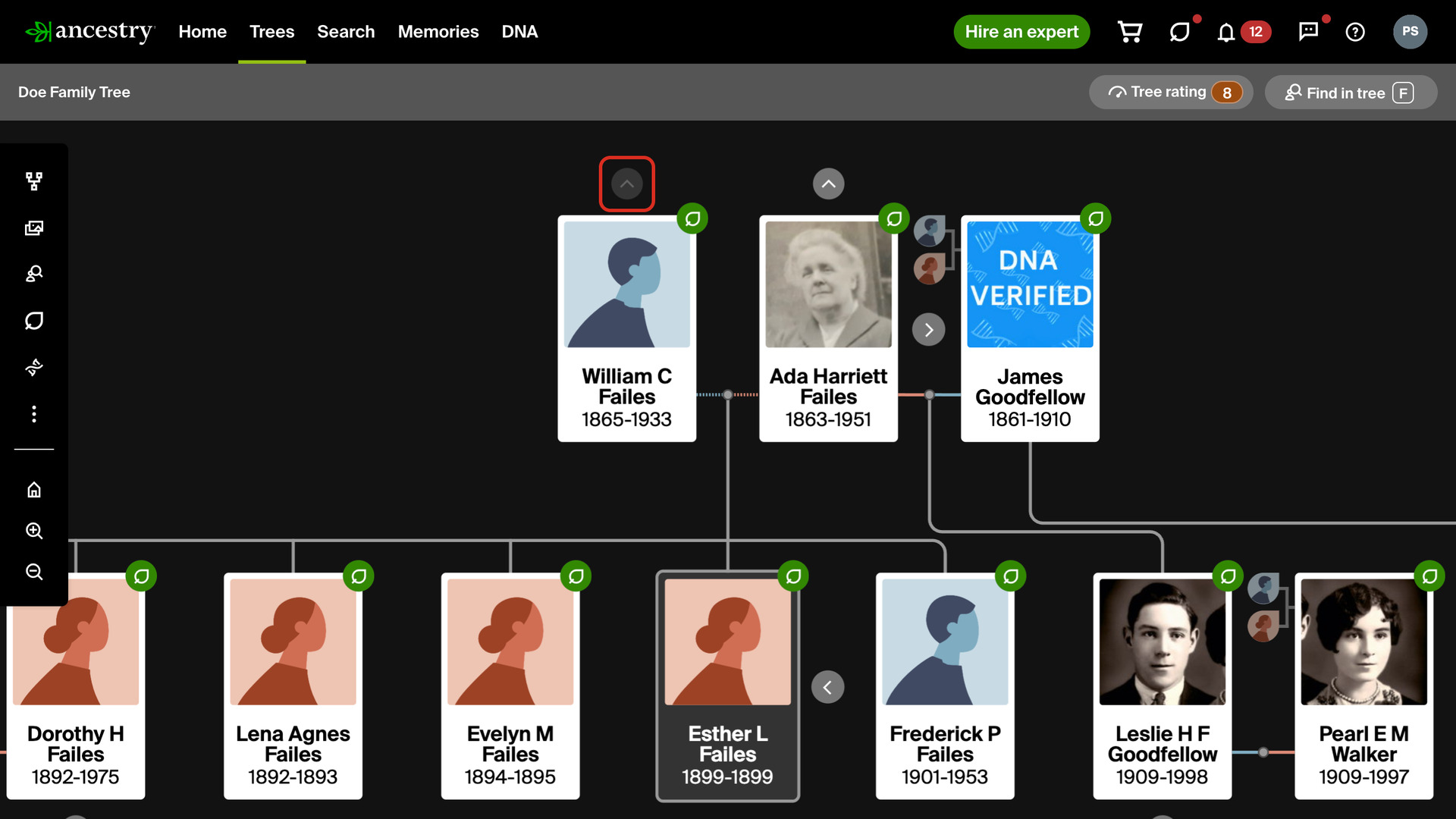
Fade Tree Arrows With No Parents fades the Show parents arrow above anyone in your Ancestry family tree who has no parents in the tree yet, so you can see at a glance which branches go further back. Ancestry draws the same arrow either way, and on someone with no parents it only opens empty Add father and Add mother cards.
How does Fade Tree Arrows With No Parents work?
Ancestry puts a small arrow above each person at the top edge of your tree, which opens the generation above them. This feature dims that arrow for anyone with no father or mother in your tree. Everyone with at least one parent keeps the arrow at full strength.
The faded arrow still works. Click it to open the Add father and Add mother cards and add their parents, just as before. Arrows fade in both the horizontal and the vertical view of the tree, and there is nothing to set up once the feature is turned on.
It reads the part of the tree that Ancestry has already loaded to draw the view, so it makes no extra requests to Ancestry and adds no wait of its own, whether the tree is just opening or you are moving from one branch of it to the next.
How do I use Fade Tree Arrows With No Parents?
- In the Genealogy Assistant pop-up panel, make sure Fade Tree Arrows With No Parents is turned on.
- Open any Ancestry family tree in the horizontal or the vertical view.
- Look at the arrows above the people at the top of the tree. A faded arrow marks someone with no parents in your tree yet.
- To add their parents, click the faded arrow, then click Add father or Add mother.
Related features
- Easy Hide and Expand in Family Tree: Expand tree, Collapse tree and Hide siblings buttons open or close one generation at a time in the vertical view, so you can stay focused on a direct line.
- Add Keyboard Shortcuts to Family Tree: Move around any Ancestry tree with single-key shortcuts, and search anyone on eight genealogy sites from their person card, even in other members’ trees.
- Custom Tree Viewing Options: Applies your preferred Tree viewing options, such as showing all spouses, to each tree the first time you open it, instead of setting every tree by hand.
Fade Tree Arrows With No Parents is a feature of the software Genealogy Assistant.
Genealogy Assistant is an extension for Google Chrome, Mozilla Firefox, Microsoft Edge and Apple Safari which supercharges your family history research by adding over 100 custom features to popular genealogy websites like Ancestry, MyHeritage, FamilySearch, FamilyTreeDNA and more.
Install Genealogy Assistant for Google Chrome | Install for Mozilla Firefox | Install for Microsoft Edge | Install for Apple Safari