

What problem does FamilyTreeDNA AScM on Match Lists solve?
FamilyTreeDNA AScM on Match Lists adds each match’s average segment size (AScM) to the Chromosome Browser and Family Finder match lists on FamilyTreeDNA. FamilyTreeDNA never shows the average. The Family Finder list does not even show the number of segments, so you would work it out by hand for every match.
How does FamilyTreeDNA AScM on Match Lists work?
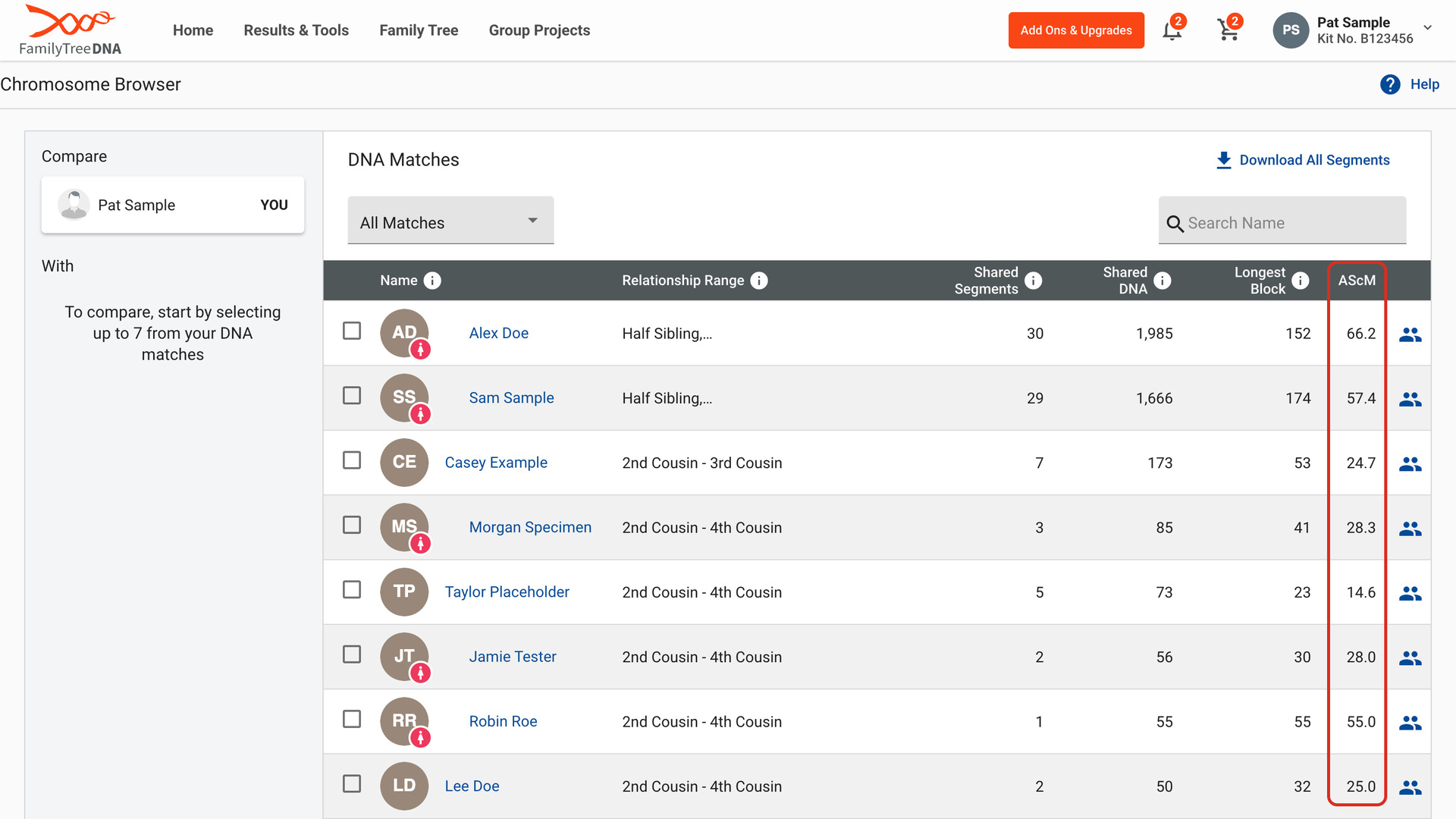
AScM is the shared cM divided by the number of segments you share. On the Chromosome Browser, the DNA Matches list already shows Shared Segments, Shared DNA and Longest Block. An AScM column is added after Longest Block, worked out from the numbers in each row.
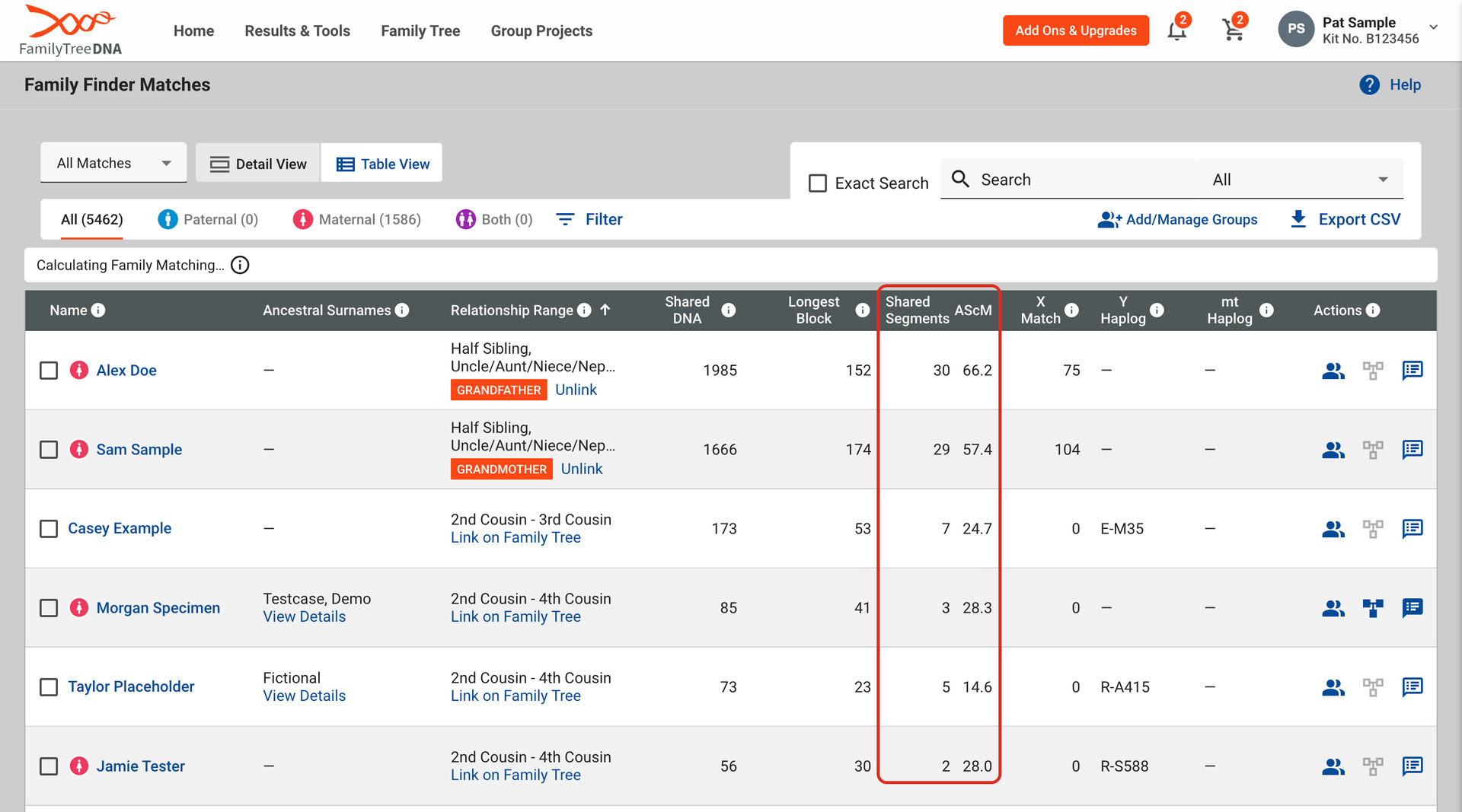
Your Family Finder matches list shows the shared DNA and longest block but no segment count. The segment counts are fetched from FamilyTreeDNA for the matches on the page you are viewing, so each page fills in a moment after it loads. It follows the page you are on, the Paternal and Maternal tabs, your search and your sort.
In Table View, two columns are added after Longest Block: Shared Segments and AScM.
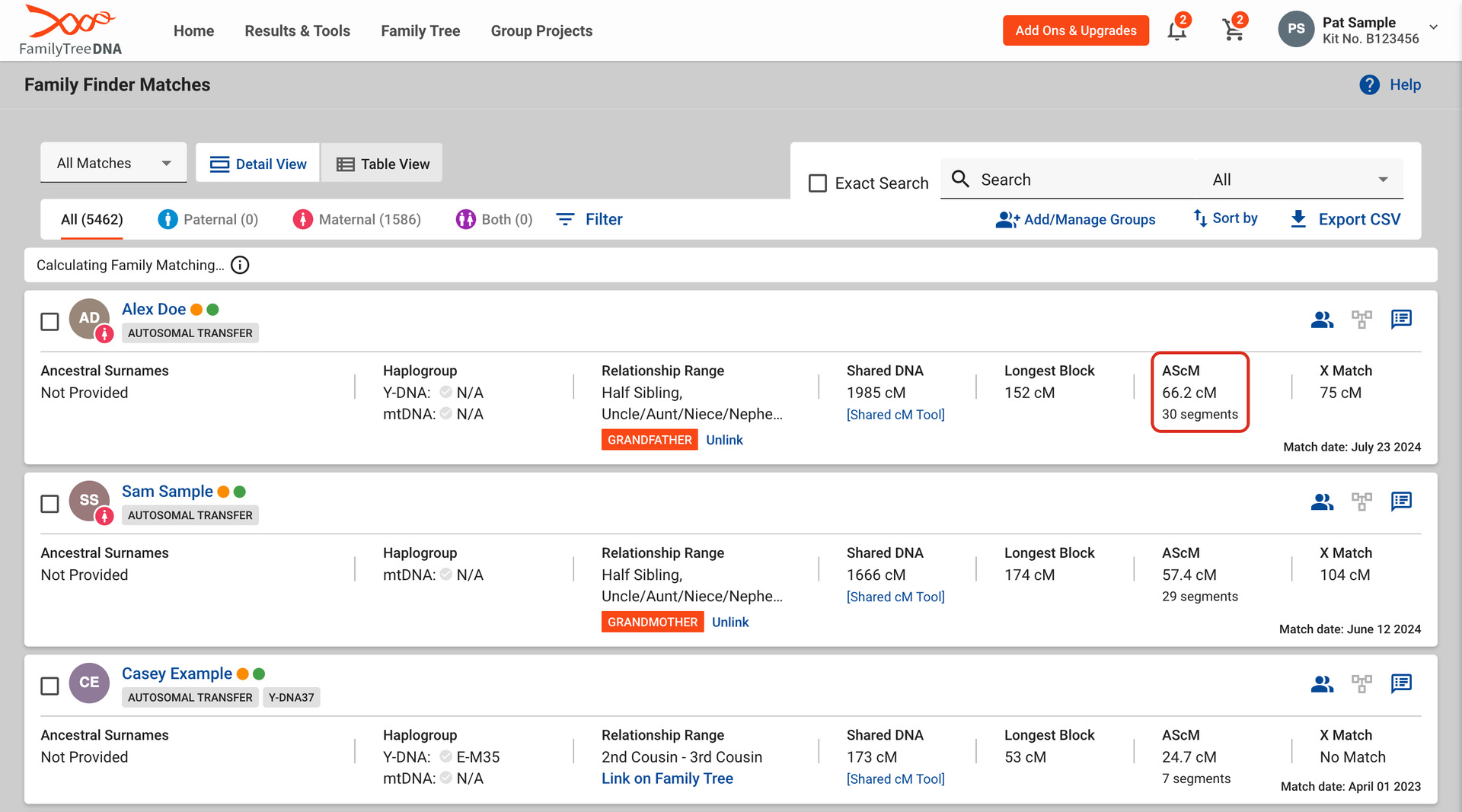
In Detail View, each match card gets an AScM column beside Longest Block, in the card’s own style. It shows the average in cM, with the number of segments underneath.
Hover over AScM to see how it is worked out, or click it to open a video explaining it. Now and then two of your matches share the same name, shared DNA and longest block but not the same segment count. Their AScM is left blank rather than risk showing the wrong one.
With endogamous ancestry, matches share many small segments from the same population, so the average tells you more than the total. One long segment and a high average point to a closer cousin than the same total spread over dozens of small pieces.
Gil Bardige, who coined the term AScM, explains his method in the JewishGen Talks webinar Help! I Got My DNA Results and I’m Confused, using the Chromosome Browser list for FamilyTreeDNA. He starts with matches sharing 90 cM or more, then picks those with a longest segment of 20 cM or more and an AScM of 12 cM or more.
His first rule is to expect exceptions. Close relatives, such as second cousins and closer, share many segments and can miss the cut-offs. The average is a guide to which matches to look at first, not a verdict on any one of them.
Genealogy Assistant can mark those matches for you. With Highlight AScM ticked in Advanced Settings, the AScM is shown in bold when a match reaches all three values, and hovering over it says so. The values are 90, 20 and 12 cM unless you change them, and the bold stays off until you tick the box.
To keep these figures for every match in a spreadsheet, use FamilyTreeDNA: Download Matches as CSV. It adds the segment count and the AScM to FamilyTreeDNA’s own Export CSV file.
How do I use FamilyTreeDNA AScM on Match Lists?
- In the Genealogy Assistant pop-up panel, make sure FTDNA: AScM on Match Lists is turned on.
- Open the Chromosome Browser from Results & Tools on FamilyTreeDNA. The AScM column is after Longest Block in the DNA Matches list.
- Or open your Family Finder matches list, in Table View or Detail View. The segment counts and AScM fill in a moment after each page loads.
- To have the AScM shown in bold, click the settings icon next to FTDNA: AScM on Match Lists in the pop-up panel. Advanced Settings opens at DNA Match Highlighting.
- Tick Highlight AScM under Average Segment (AScM), and change its three values if you want to. The box saves as soon as you tick it, and each value as soon as you click away from it.
- Reload the FamilyTreeDNA page.
Related features
- Segment Stats on DNA Match Pages: Shows the unweighted cM, segment count, longest segment and average segment size (AScM) under the shared DNA on every match page, without opening the pop-up.
- FamilyTreeDNA: Download Matches as CSV: Save FamilyTreeDNA’s own Export CSV file of your Family Finder matches with two more columns: each match’s segment count and average segment size (AScM).
- FamilyTreeDNA: DNA Painter Shared cM Tool: Click the shared cM of any match in a FamilyTreeDNA matches list to open it in DNA Painter’s Shared cM Tool.
FamilyTreeDNA AScM on Match Lists is a feature of the software Genealogy Assistant.
Genealogy Assistant is an extension for Google Chrome, Mozilla Firefox, Microsoft Edge and Apple Safari which supercharges your family history research by adding over 100 custom features to popular genealogy websites like Ancestry, MyHeritage, FamilySearch, FamilyTreeDNA and more.
Install Genealogy Assistant for Google Chrome | Install for Mozilla Firefox | Install for Microsoft Edge | Install for Apple Safari