

What problem does Add Birth Ranges to Census Records solve?
Add Birth Ranges to Census Records adds a line to Ancestry census records that gives the dates the person was born between, worked out from their age and the day the census was taken. Ancestry’s own estimate is the census year minus the age, which is often a year out, because most censuses were taken in spring.
How does Add Birth Ranges to Census Records work?
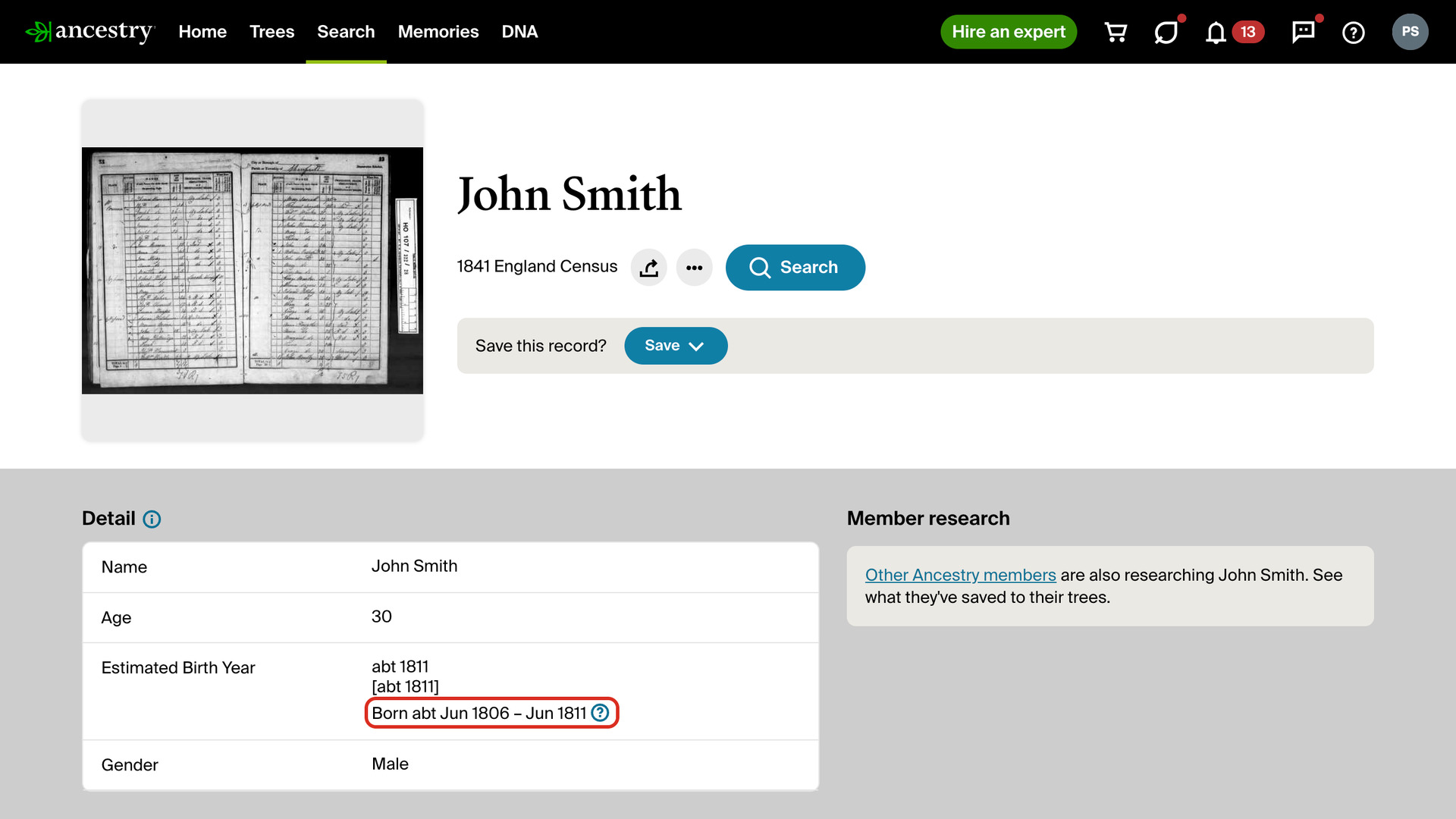
Under Birth Year or Estimated Birth Year on a census record, a line starting with Born abt gives the first and last months the person could have been born. Most censuses give a one-year range: for someone aged 20 in the 1881 England Census it gives April 1860 to April 1861, where Ancestry shows about 1861.
The range is wider for 1841. A man aged 30 in the 1841 England Census, taken on 6 June 1841, was born between 7 June 1806 and 6 June 1811, where Ancestry shows about 1811.
The usual question was each person’s age at their last birthday. The range follows the rule of the census you are looking at, so these give different ranges:
- The 1851 and 1861 censuses of Canada East and Canada West asked for the age at the next birthday.
- The 1841 censuses of England, Wales and Scotland rounded adults’ ages down to 5 years, so an age of 30 means 30 to 34.
- The 1890 United States census asked for the age at the nearest birthday.
- A baby recorded in months, such as 3/12 or 3 months, gets a range of one month.
Click the ? beside the range for the exact first and last dates, here 4 April 1860 and 3 April 1861, and how they were worked out: the age, the census day and how that census counted ages, with a link to the official source. The range assumes the age on the record is right, and families and enumerators did sometimes get ages wrong.
On a person’s Facts page, a census in their sources that was taken before the birth date in your tree, or after the death date, gets a red line on its card in the Timeline. It is often a sign that the record belongs to someone else of the same name. A date in your tree such as about 1907 is left out, since it cannot rule a census out.
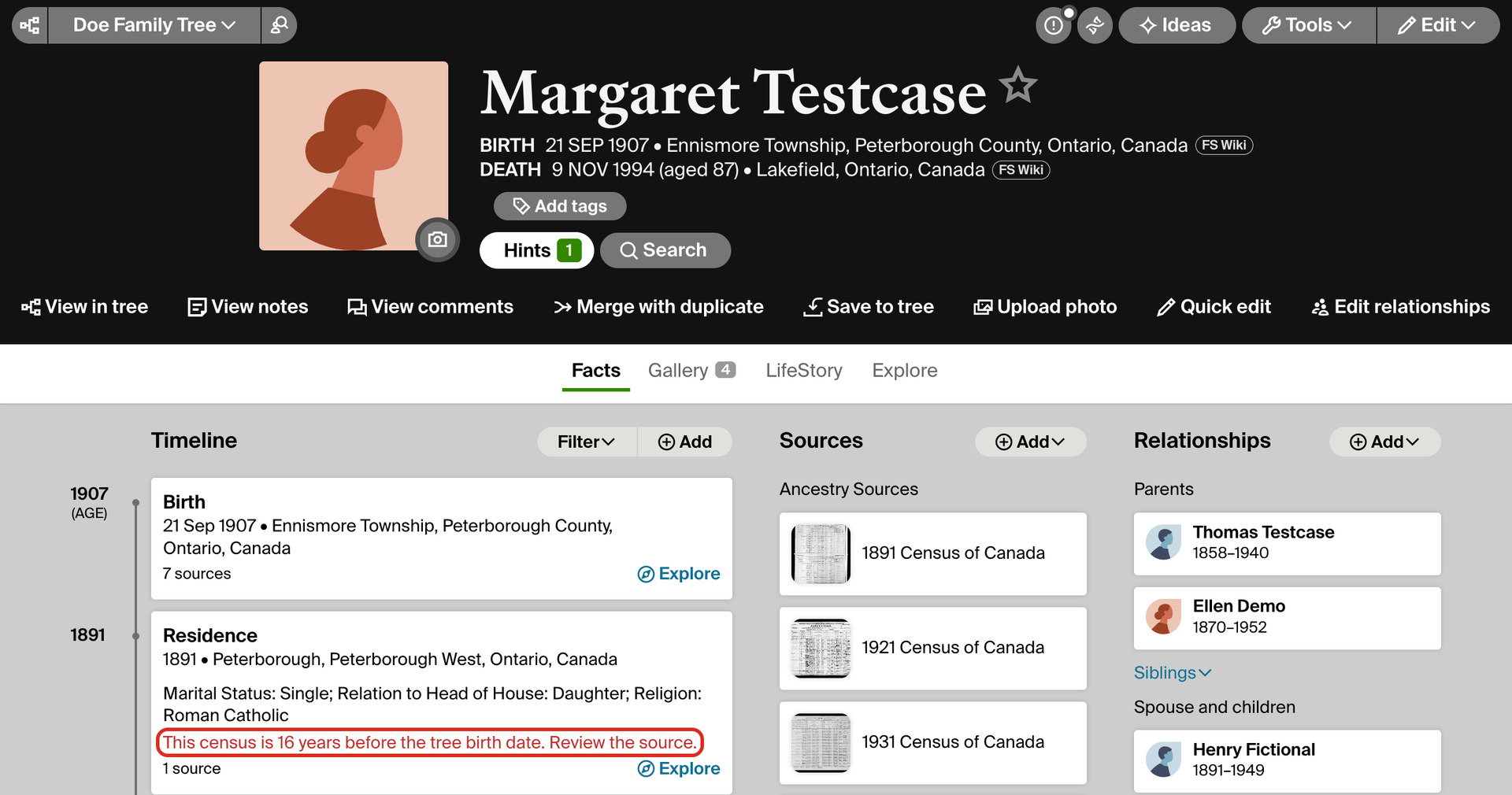
There is nothing to set up. The range and the red line come from what the record and the Facts page already show, so they appear with the page.
How do I use Add Birth Ranges to Census Records?
- In the Genealogy Assistant pop-up panel, make sure Add Birth Ranges to Census Records is turned on.
- Open a census record on Ancestry, from a search, a hint or a person’s sources.
- Under Birth Year, Estimated Birth Year or, on some censuses, Birth Date, read the months the person was born between.
- To see the exact dates and how they were worked out, click the ? beside the range. Press Esc or click elsewhere to close it.
- To check a person’s censuses against your tree, open their Facts page. A census that cannot be theirs has a red line on its Timeline card.
Why don’t I see the birth range?
- If the record gives the full birth date, as some later censuses do, there is no range: the record’s own date is better.
- The United States censuses from 1790 to 1840 count each household’s people by age group and give no one’s own age, so there is nothing to work from.
- A census whose day and age rule are not yet confirmed from an official source, such as New Brunswick in 1851, shows nothing, and so do Ancestry sites in other languages. Census Days and Age Rules lists every census that is covered.
Related features
- Advanced Search for Records Page: A Search menu at the top of transcribed record pages looks for the same person on other genealogy websites, using the names, dates and places in the record.
- Add Advanced Search to Profiles: Search anyone in your Ancestry tree on eight genealogy websites from their profile, with civil registration indexes beside each place and an age added to the death date.
- FamilySearch: Add Birth Ranges to Census Records: Shows the dates a person was born between on FamilySearch census records, worked out from their age and the day the census was taken.
Add Birth Ranges to Census Records is a feature of the software Genealogy Assistant.
Genealogy Assistant is an extension for Google Chrome, Mozilla Firefox, Microsoft Edge and Apple Safari which supercharges your family history research by adding over 100 custom features to popular genealogy websites like Ancestry, MyHeritage, FamilySearch, FamilyTreeDNA and more.
Install Genealogy Assistant for Google Chrome | Install for Mozilla Firefox | Install for Microsoft Edge | Install for Apple Safari