

What problem does Show Marriage Dates in Family Tree solve?
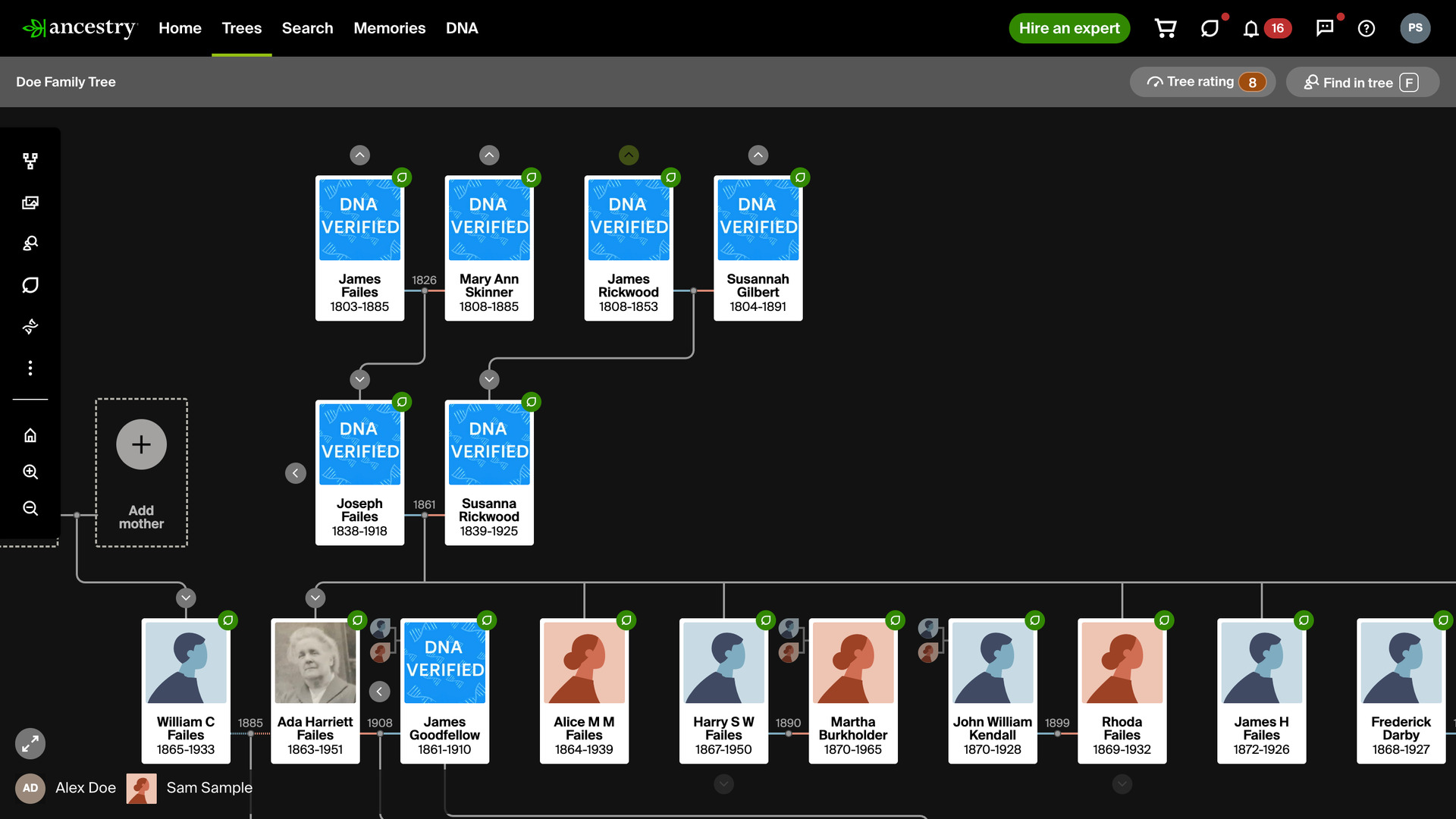
Show Marriage Dates in Family Tree shows the year each couple married right in your Ancestry family tree, so you can follow when a family began without opening anyone’s profile. Ancestry keeps the marriage on each person’s profile only, and the tree shows nothing between a husband and wife but the line that joins them.
How does Show Marriage Dates in Family Tree work?
In the vertical view of the tree, the year a couple married appears in the gap between their two cards, just above the line that joins them. Someone who married twice shows each year beside the right spouse, so a widow’s first and second marriages are never mixed up.
An estimated date keeps Ancestry’s own word above the year, such as Abt. or Bef., so it never reads as an exact year. A date given as a range between two years shows nothing, and a couple with no marriage date in your tree shows nothing either.
To see the month as well, tick Show month with marriage years on the Advanced Settings page, under Ancestry Tree Viewing Options. The month then sits above the year, such as Apr above 1908. It is off by default, and a change shows the next time you open or reload a tree.
The years come from the part of the tree that Ancestry has already loaded to draw the view, so the feature makes no extra requests to Ancestry and adds no wait of its own, whether the tree is just opening or you are expanding a branch.
How do I use Show Marriage Dates in Family Tree?
- In the Genealogy Assistant pop-up panel, make sure Show Marriage Dates in Family Tree is turned on.
- Open any Ancestry family tree in the vertical view.
- Look between each married couple for the year they married, just above the line that joins them.
- To add the month, click the settings icon next to Show Marriage Dates in Family Tree in the pop-up panel, then tick Show month with marriage years. Reload the tree to see it.
Related features
- Fade Tree Arrows With No Parents: Fades the Show parents arrow above anyone with no parents in your tree, so you can see at a glance which branches go further back.
- Custom Tree Viewing Options: Applies your preferred Tree viewing options, such as showing all spouses, to each tree the first time you open it, instead of setting every tree by hand.
- Easy Hide and Expand in Family Tree: Expand tree, Collapse tree and Hide siblings buttons open or close one generation at a time in the vertical view, so you can stay focused on a direct line.
Show Marriage Dates in Family Tree is a feature of the software Genealogy Assistant.
Genealogy Assistant is an extension for Google Chrome, Mozilla Firefox, Microsoft Edge and Apple Safari which supercharges your family history research by adding over 100 custom features to popular genealogy websites like Ancestry, MyHeritage, FamilySearch, FamilyTreeDNA and more.
Install Genealogy Assistant for Google Chrome | Install for Mozilla Firefox | Install for Microsoft Edge | Install for Apple Safari